

What is an email forwarder?
Think of mail forwarding at the post office. You move to a new house, and the post office sends your letters there. An email forwarder does the same. Mail sent to info@yourdomain.com can land in your Gmail inbox instead.
A forwarder does not store mail. It only passes it on. That is the main difference from a full email account.
Steps
- Log in to DirectAdmin.
- Open E-Mail Manager, then click E-Mail Forwarders.

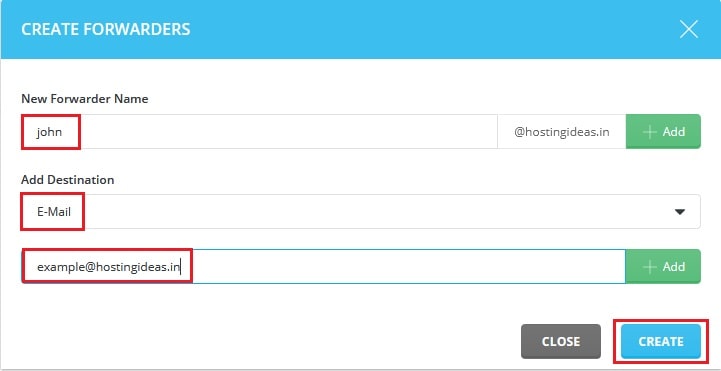
- Click Create New E-Mail Forwarder.

- In the first box, type the name before the @ sign, for example
info. - Pick the domain if you have more than one.
- In the destination box, type the address that should get the mail, for example
myname@example.com. - To send to more than one address, put each on its own line or separate them as the form asks.
- Click Create.
Test it
- Use another email account to send a short message to the forwarder address.
- Wait a minute.
- Check the destination inbox. Look in the spam folder too.
Change or remove a forwarder
- Go back to E-Mail Forwarders.
- Click the forwarder name to change where it sends mail.
- To remove it, tick the box and click Delete.
Tip: Do not forward an address to itself. This creates a loop and mail can bounce back and forth.
If mail does not arrive, make sure your domain is pointed to Hostvento hosting. You can ask support through a ticket.
Quick recap
- A forwarder passes mail to another address and keeps no copy.
- Open E-Mail Forwarders and click Create New E-Mail Forwarder.
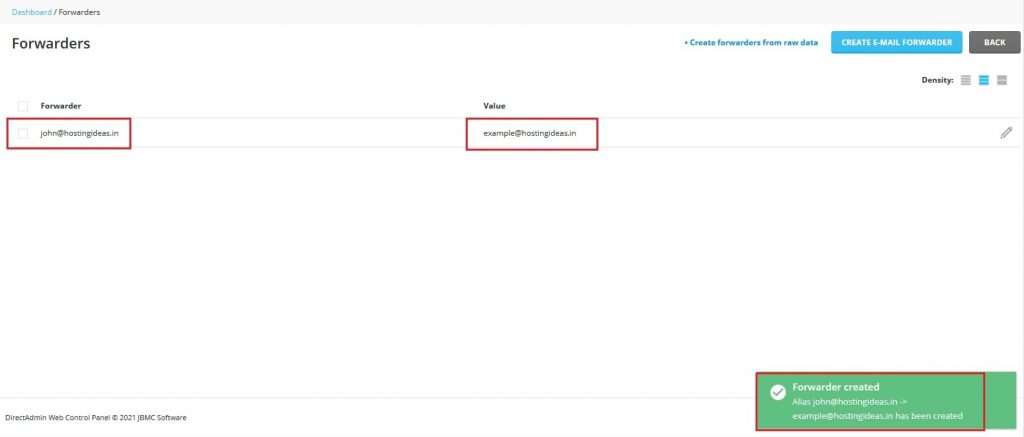
- Type the source name and the destination address.
- Test by sending yourself a message.