

What is FTP?
FTP stands for File Transfer Protocol. It is a way to send files between your computer and your web hosting, like a delivery truck between two buildings. You use a small program called an FTP client to do it. FileZilla is a popular free one.
An FTP account is a username and password for this truck. You can make extra accounts, so a web designer can work without seeing your main password.
Steps
- Log in to DirectAdmin.
- Open FTP Management.
- Click Create FTP Account.


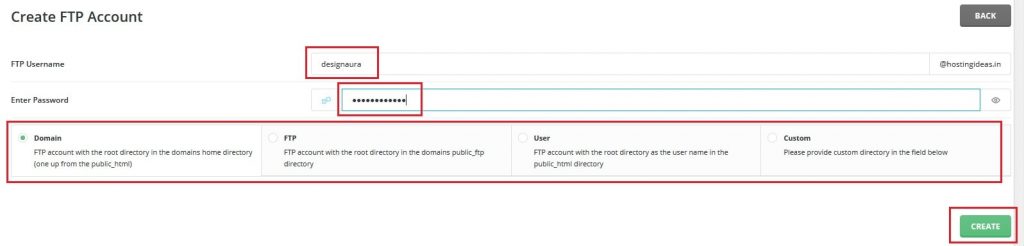
- Type a username. It will end with your domain name.
- Type a strong password.
- Choose the folder the account can use. The default is the main website folder, often called
public_html. A folder is just a place to keep files. - Set a quota if you want to limit how much space the account can use.
- Click Create.
Connect with an FTP client
- Open your FTP client.
- In Host, type your domain name or the server name from your welcome email.
- In Username, type the full FTP username shown in DirectAdmin.
- Type the password.
- Set the port to
21, or use the port your welcome email gives. - Click Connect.
If your host supports SFTP, a safer type of transfer, ask support for the right settings.
Tip: Limit each account to the folder it needs. A helper who only edits one site should not reach everything.
Delete or change an account
Return to FTP Management. Use the options beside the account to change the password or delete it. Deleting the account does not delete files unless the screen asks you about them.
Quick recap
- FTP moves files between your computer and your hosting.
- Create accounts in FTP Management.
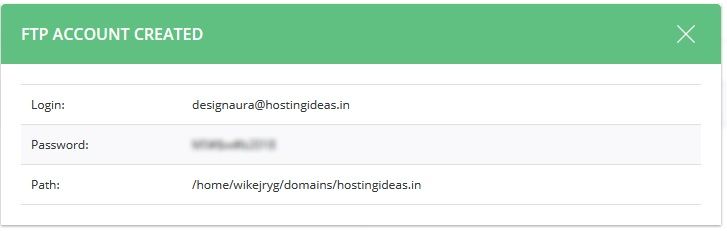

- Choose the folder and a strong password.
- Connect with a client such as FileZilla.