

What does deleting a domain do?
A domain is the name of a website, like example.com. When you delete a domain from DirectAdmin, the panel removes that site from your account. This can also remove its files, email accounts, subdomains and settings.
Warning: this can delete data for good. Take a full backup first. Download the files, databases and emails you want to keep.
Deleting the domain here does not cancel the domain registration. Registration is the yearly booking of the name itself. You manage that in your client area, under Domains, at the Hostvento client area.
Before you delete
- Make a backup of your website files.
- Export your databases.
- Save any email you want to keep.
- Make sure you picked the right domain. Check the name twice.
Steps
- Log in to DirectAdmin.
- Open Account Manager, then click Domain Setup.
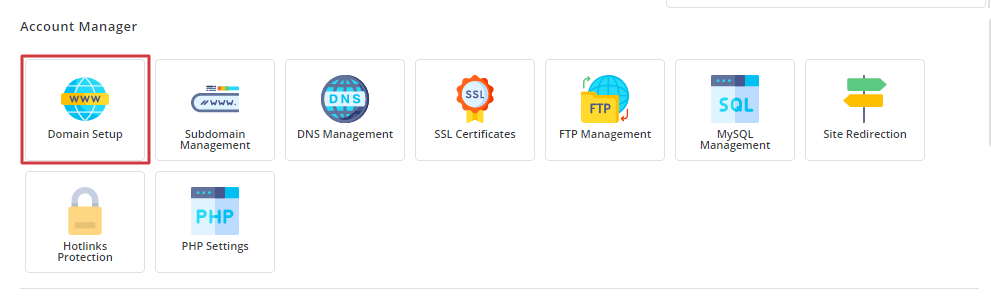
- Find the domain you want to remove in the list.
- Tick the box next to it.
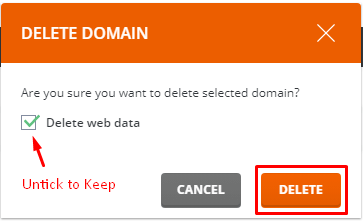
- Click Delete.
- Read the message on the screen. It asks you to confirm.
- Click Confirm to finish.
After a short time, the domain disappears from the list.
If you cannot delete it
- The domain may be the main domain of the account. You cannot remove this one. You would have to remove the whole account instead.
- Your plan may not allow changes. Ask support through a ticket.
Tip: If you only want a site to stop showing, you can empty its folder or suspend it instead. This is safer than deleting.
Quick recap
- Back up files, databases and email first.
- Use Domain Setup, tick the domain and click Delete.

- Deleting here does not cancel the name's registration.
- The main domain of an account cannot be deleted this way.