

What is account suspension?
Suspending an account means putting it on pause. The website and email stop working, but the data stays safe. It is like closing a shop for a while without throwing out the goods. A reseller or server owner may do this when a bill is late or when a rule was broken.
When an account is suspended, DirectAdmin can email the user. The email uses a template. A template is a ready-made text with blanks that the system fills in, such as the user's name.
This guide needs admin or reseller access.
Option 1: Use the panel
- Log in to DirectAdmin as a reseller or admin.

- Go to Reseller Level.
- Look for an item such as Customize Messages, Edit Message Templates or Reseller Settings.
- Find the message about suspension.
- Change the text in the box.
- Click Save.
Menu names depend on your DirectAdmin version. If you cannot find it, use Option 2.
Option 2: Edit the template file (server owners)
This needs root access, which is the all-powerful login of a server.
- Log in to the server with SSH, a secure way to type commands.
- Look in the template folder:
ls /usr/local/directadmin/data/templates/This lists the default template files. Find the one for suspension.
- Make a custom folder if it does not exist:
mkdir -p /usr/local/directadmin/data/templates/customThis makes a safe place for your changes. Updates do not overwrite it.
- Copy the suspension template into the custom folder.
- Open the copy with a text editor and change the words. Keep any parts that look like
|name|as they are. These are blanks DirectAdmin fills in.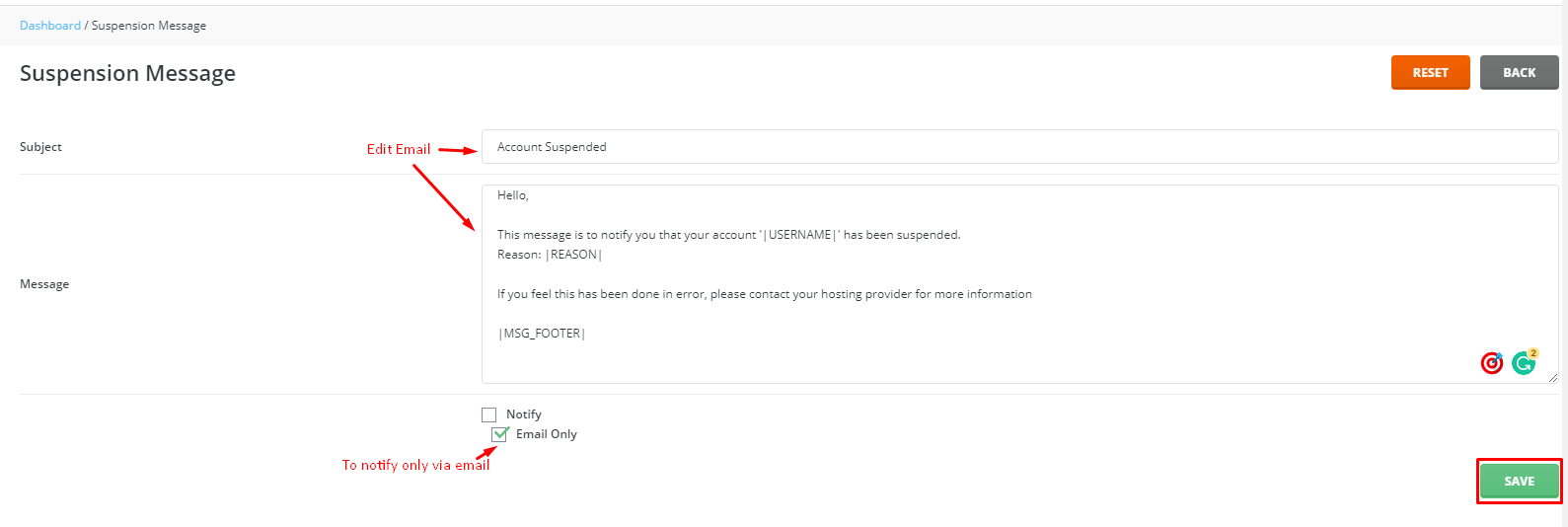
- Save the file.
To test it, suspend and unsuspend a test account. For help, use the support page.
Quick recap
- Suspension pauses an account without deleting data.
- The email comes from a template.
- Edit it in the panel, or copy the template to the custom folder.
- Keep the placeholder words that look like
|name|.