

What is email routing?
Email routing decides where mail for your domain is delivered. Think of a post office with two choices. It can keep the letters in its own boxes, or it can send them on to another post office. This choice is called local or remote delivery.
- Local means your mail is handled by this hosting server.
- Remote means another service handles your mail, such as a separate email provider.
Getting this wrong is a common reason why emails do not arrive. If you use another provider for email, you must set it to remote. Otherwise, mail sent from your own website to your own domain can stay on the server and never leave.
Steps
- Log in to DirectAdmin.
- Open E-Mail Manager.

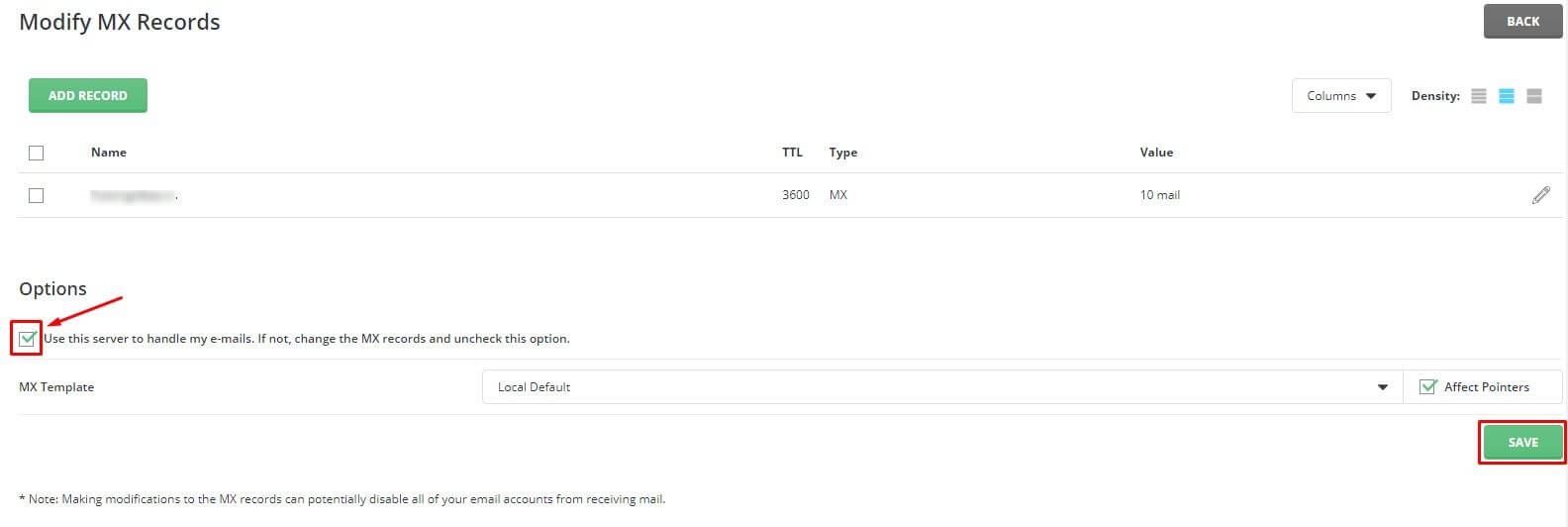
- Click MX Records. MX records are DNS settings that say which server receives mail for your domain. DNS is like a phone book for the internet.
- Choose the domain, if you have more than one.
- Find the box named Use this server to handle my emails.
- If your mail lives on this hosting, tick the box.
- If your mail lives with another provider, untick the box.
- Click Save.
If your mail is with another provider
- Untick the local option as shown above.
- Open DNS Management.
- Edit the MX records so they match what your mail provider tells you.
- Save and wait for the change to spread. This can take some hours.
Warning: changing MX records can stop mail from arriving for a while. Do it at a quiet time, and keep the old values written down.
Test
- Send a message to your domain address from a different account, such as a free webmail one.
- Check that it arrives in the right place.
Tip: You can also ask Hostvento to check your settings. Open a ticket at the support page.
Quick recap
- Local routing keeps mail on this server.
- Remote routing sends mail to another provider.
- Tick or untick Use this server to handle my emails in MX Records.
- Match your MX records to your mail provider.