

What is webmail?
Webmail is an email program that runs in your web browser. You do not install anything. Roundcube is a common webmail program. You open it, log in and read your mail, like using a free email service.
Normally you must type the full email address and password each time. Auto-login skips that. DirectAdmin signs you in for you.
Steps
- Log in to DirectAdmin. You can start from your client area.
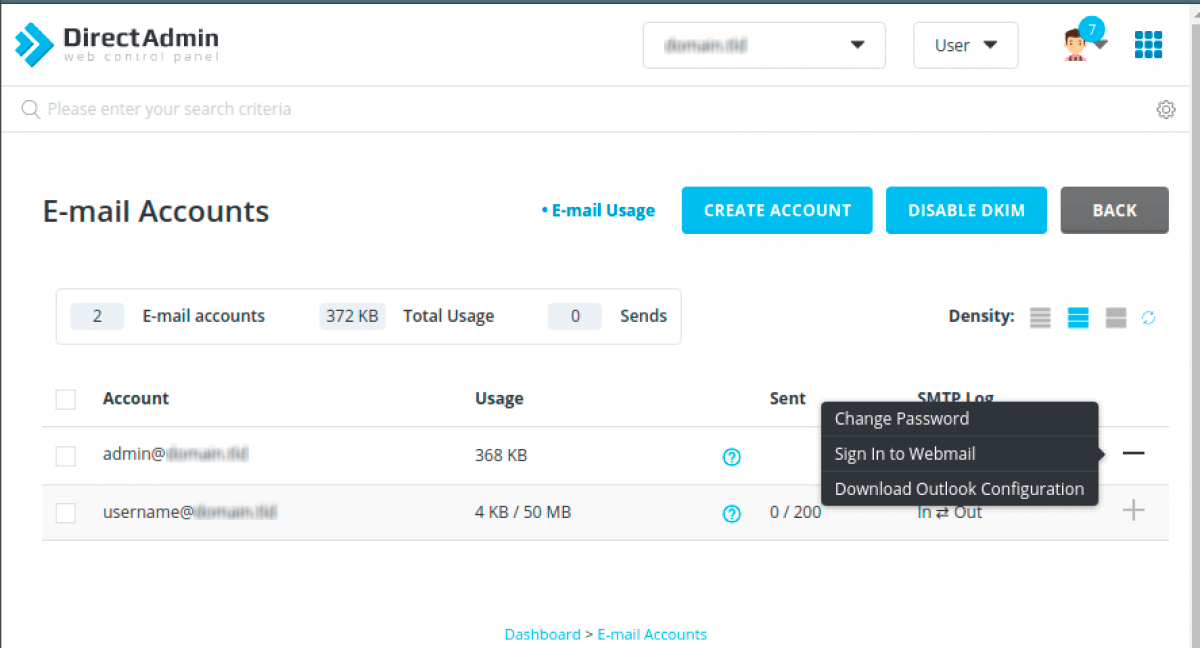
- Click Email Accounts. This is in the Email Manager section.
- You see a list of your email accounts.
- Find the account you want to open.
- Click the Webmail or Log in link or icon next to it.
- If DirectAdmin gives you a choice of webmail programs, pick one, such as Roundcube.
- Your mailbox opens in a new tab.
The name of the button can vary between DirectAdmin versions and skins. Look for a link or arrow on the row of the email account.
If auto-login is missing
Auto-login is a setting controlled by the server. If you do not see the link, the server owner may have turned it off. Ask Hostvento support to check. You can still use webmail the normal way.
The normal webmail login
- Open a new browser tab.
- Go to
yourdomain.com/webmail. Replaceyourdomain.comwith your own domain. - Type the full email address, for example
info@yourdomain.com. - Type the password for that email account.
- Click Login.
If you do not know the email password, you can reset it in DirectAdmin. Go to Email Accounts and use the Change Password option on that account.
Quick recap
- Webmail is email in your browser.
- Auto-login opens a mailbox from DirectAdmin without a password.
- Go to Email Accounts and click the webmail link on the account row.
- If it is missing, use
yourdomain.com/webmailor ask Hostvento support.