

What does the message mean?
SSL is a lock for your website. It scrambles the data between your visitor and your site. A site with SSL shows a padlock and starts with https://. The message says that the domain has no SSL switched on in its settings.
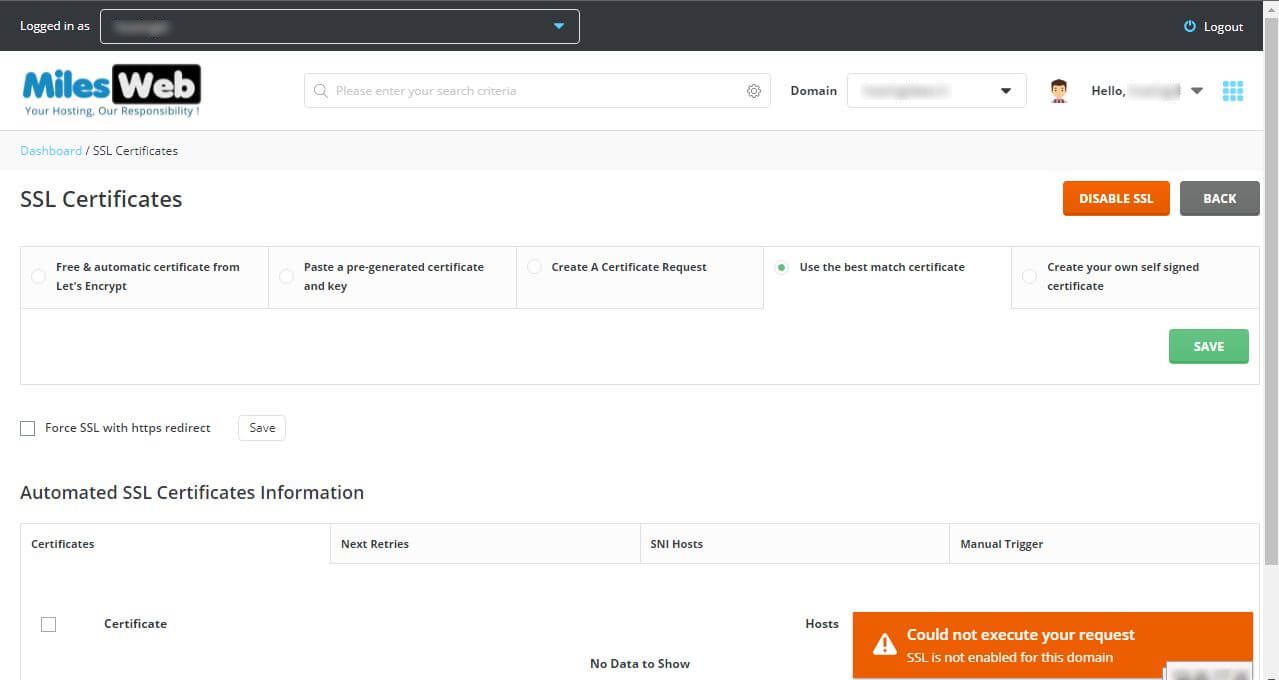
In DirectAdmin, a domain has an option called Secure SSL. If it is off, the domain cannot use an SSL certificate. A certificate is a small file that proves your site is real.
Common causes
- The Secure SSL option is off for the domain.
- No certificate has been installed yet.
- The domain was newly added and the setting was not copied over.
Steps
- Log in to DirectAdmin.
- Open Account Manager, then Domain Setup. On some skins, it is called Domain Administration.
- Click the domain you want to fix.
- Find the option Secure SSL. Tick it to turn it on.
- If you see Use a symbolic link from private_html to public_html, tick it. Then both HTTP and HTTPS show the same website files. If you want separate files for HTTPS, leave it unticked.
- Click Save.
Now go back and install your certificate:
- Open SSL Certificates from the main menu.
- Pick Free & automatic certificate from Let's Encrypt, or paste in a certificate you bought.
- Follow the on-screen steps and click Save.
Tip: If the Secure SSL box is missing or locked, your reseller or server owner may have turned it off in your package. Ask Hostvento support.
If it still does not work
- Clear your browser cache. A cache is saved copies of old pages.
- Wait up to an hour after saving.
- Check the domain points to your hosting account in its DNS.
- Open a ticket if the error remains. Use this link and include the domain name and a screenshot.
Quick recap
- The message means the domain's Secure SSL option is off.
- Turn it on in Domain Setup and click Save.
- Then install a certificate in SSL Certificates.
- Contact support if the option is locked.