

What is a version?
A version is a number that tells you how new a program is. Think of a phone model. A newer model has newer features. DirectAdmin is a control panel. A control panel is a web page where you manage your hosting, such as files, email and domains.
Method 1: Look inside DirectAdmin
- Log in to DirectAdmin.
- Look at the footer, the bottom of the page. Some skins show the version there.
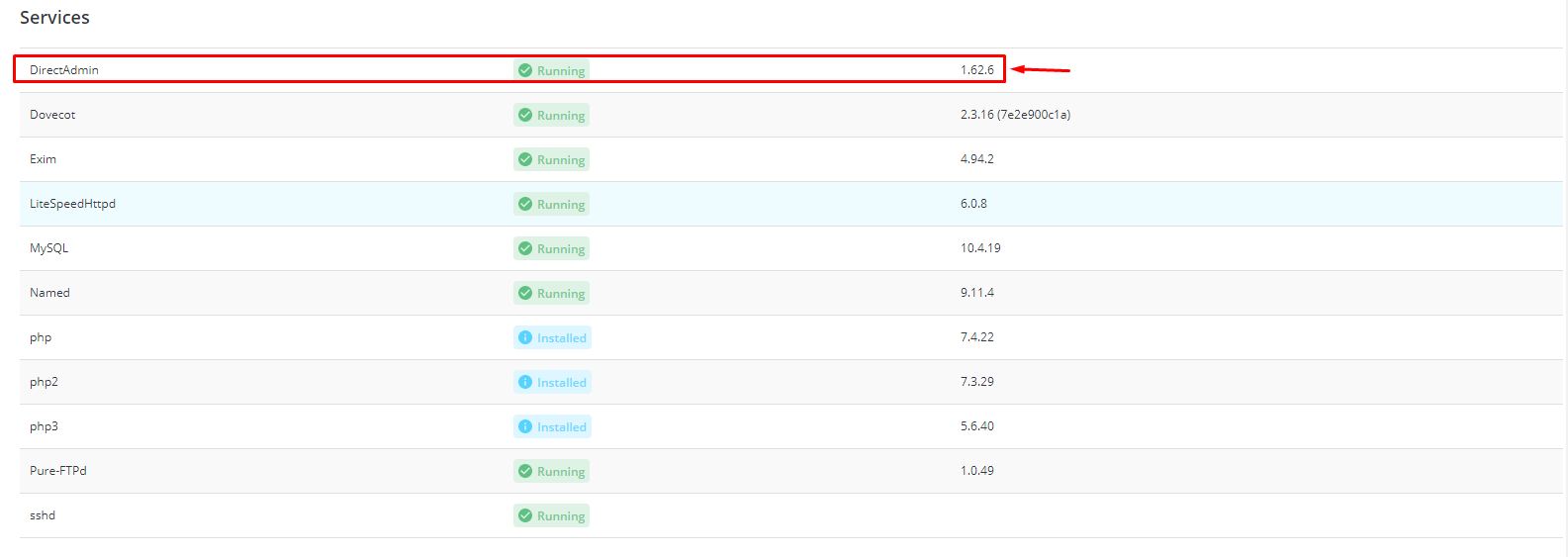
- If not, open the top-right menu with your username or the Server Information or System Info page.

- Look for the text DirectAdmin Version.
What you see depends on your skin and your access level. Admin accounts see more than normal users.
Method 2: From the command line (needs root access)
This works for VPS and dedicated server owners. Root is the all-powerful user account on a server.
- Connect to your server with SSH.
- Run this command:
/usr/local/directadmin/directadmin vThis asks DirectAdmin to print its own version and then stop.
You can also ask for more detail:
/usr/local/directadmin/directadmin versionThis prints version information, similar to the first command.
Method 3: Check the skin version
A skin is the look of the panel. Evolution is a common skin. Its version may differ from the DirectAdmin version. Support may ask for both.
Should I update?
On shared hosting, the Hostvento team handles updates. You do not need to do anything. On a VPS or dedicated server, you can update from the admin panel or ask support to help. Take a backup before any update.
Quick recap
- The version is a number that shows how new DirectAdmin is.
- Look in the footer or the system information page.
- Root users can run
/usr/local/directadmin/directadmin v. - Ask Hostvento support if you cannot find it.