

What is the new account message?
It is a welcome email. It usually holds the login name, the password and some links. It is like the information card you get when you check in at a hotel.
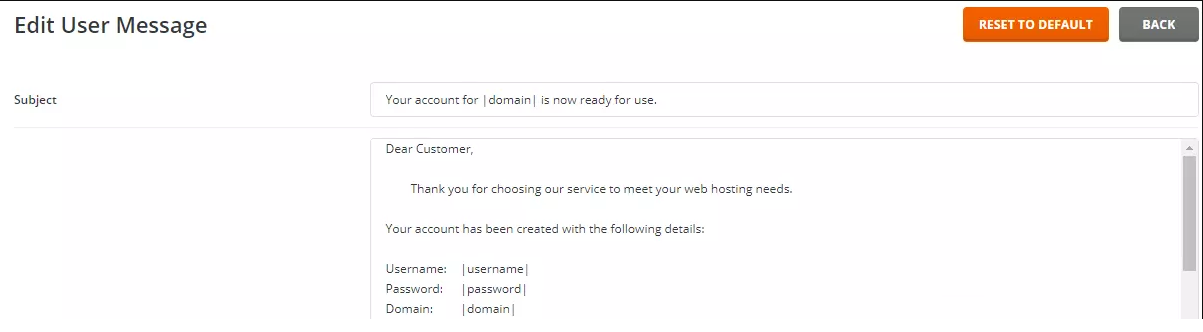
You need Reseller access in DirectAdmin to change it. Normal users do not see this option. Billing systems such as WHMCS may send their own welcome email as well. That one is edited in the billing system, not here.
Steps
- Log in to DirectAdmin as the reseller.
- Make sure you are at Reseller Level.
- Open Customize Message Templates or Message System. If you cannot find it, use the search box and type message.
- Pick the template for New Account Information. It may also be named Account Creation.
- The text appears in a box. Read it first.
- Change the words you want. Keep the special placeholders as they are.
- Click Save.
What are placeholders?
A placeholder is a word in the message wrapped in special marks. DirectAdmin swaps it for real data when it sends the email. For example, a placeholder for the user name becomes the actual user name. If you delete or mistype a placeholder, the email may show blank spaces or odd text.
Common things a placeholder may fill in are the domain, the username, the password and the server address. The exact names are shown in the template page. Copy them exactly.
Ideas for the message
- Add a friendly welcome line.
- Add a link to your help page.
- Explain how to log in.
- Tell users how to reach you.
Need to undo a change?
Copy the old text into a notepad before you edit. If you make a mess, paste the old text back. You can also ask Hostvento support.
Quick recap
- Only resellers can edit this message.
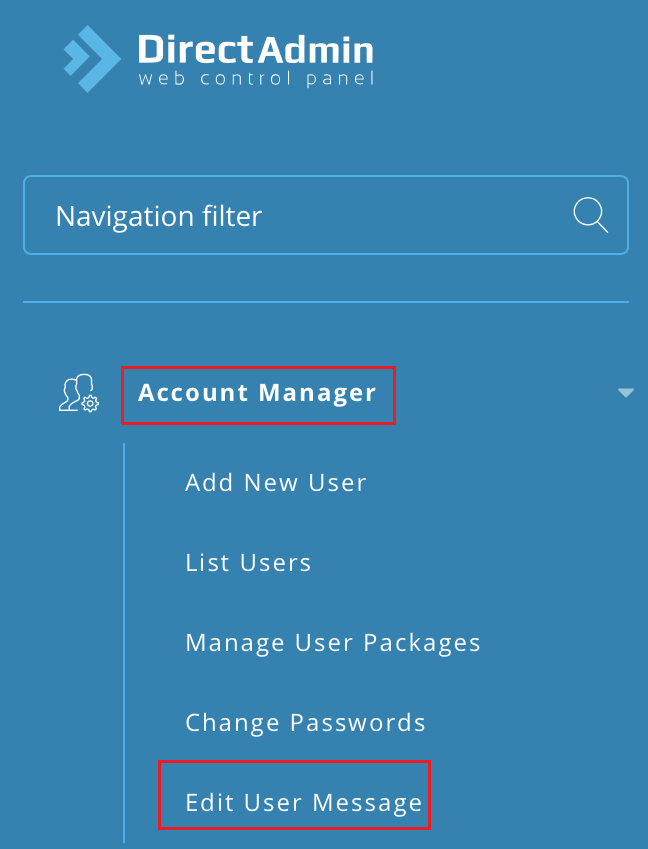
- Find the New Account Information template in the message tools.
- Change the words but keep the placeholders.
- Test with a trial user.