

Why is there a limit?
A server sets a maximum size for each upload. This protects the server from files that are too big. It is like a lift with a weight limit. If your file is too heavy, the upload fails.
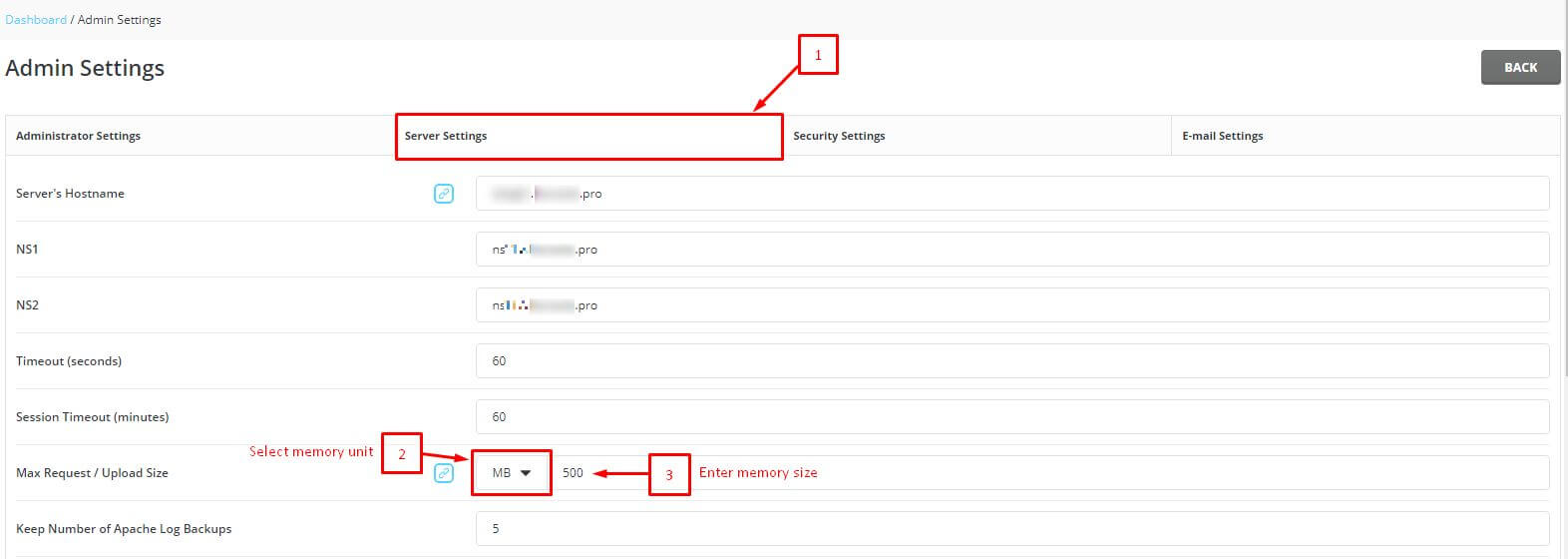
The limit comes from PHP settings and from the web server. PHP is the programming language that runs the File Manager page.
Changing it may need root access. Root is the main owner account on a server. VPS and dedicated server customers have it. On shared hosting, you do not. In that case, open a support ticket and ask Hostvento to help.
Easy ways around the limit
- Compress the files into a
.zipfile. Upload it, then extract it in File Manager. - Use FTP. FTP is a way to send files with a program such as FileZilla. It has no tight size limit.
- Upload several small files, not one big one.
Steps for server owners (root access needed)
- Connect to your server with SSH.

- Find your PHP configuration file. It is often named
php.ini. The path depends on your PHP version. A common place on DirectAdmin servers is under/usr/local/php, in a folder named after the version, thenlib. - Make a copy:
cp php.ini php.ini.backupThis saves a spare copy named php.ini.backup.
- Open the file in an editor such as
nano. - Find these two lines and set bigger values:
upload_max_filesize = 128M
post_max_size = 128M
The first sets the biggest single file. The second sets the biggest total of an upload. Keep post_max_size equal to or bigger than the first. The letter M means megabytes.
- Save the file.
- Restart the web server so the change takes effect. The command depends on your setup, for example
systemctl restart httpdorsystemctl restart apache2.
Some versions of File Manager also have their own limit. If it still fails, ask support.
Quick recap
- Servers limit upload size to stay safe.
- Zip big files, or use FTP.
- With root access, raise
upload_max_filesizeandpost_max_sizeinphp.ini. - Restart the web server afterwards.
- On shared hosting, ask support.