

What is a mail queue?
The mail queue is a waiting line for outgoing emails. When you send a message, the server does not always send it at once. It may need to retry if the other side is busy. The message waits in the queue. It is like letters sitting in an outbox before the post van arrives.
A few messages in the queue is normal. Hundreds can mean a problem, such as a hacked mailbox sending spam.
The queue is a server-level feature. You need Admin access, which means a VPS or dedicated server. On shared hosting, ask Hostvento support.
View the queue
- Log in to DirectAdmin as Admin.
- Go to Admin Level.
- Click Mail Queue Administration. Use the search box if you cannot see it.

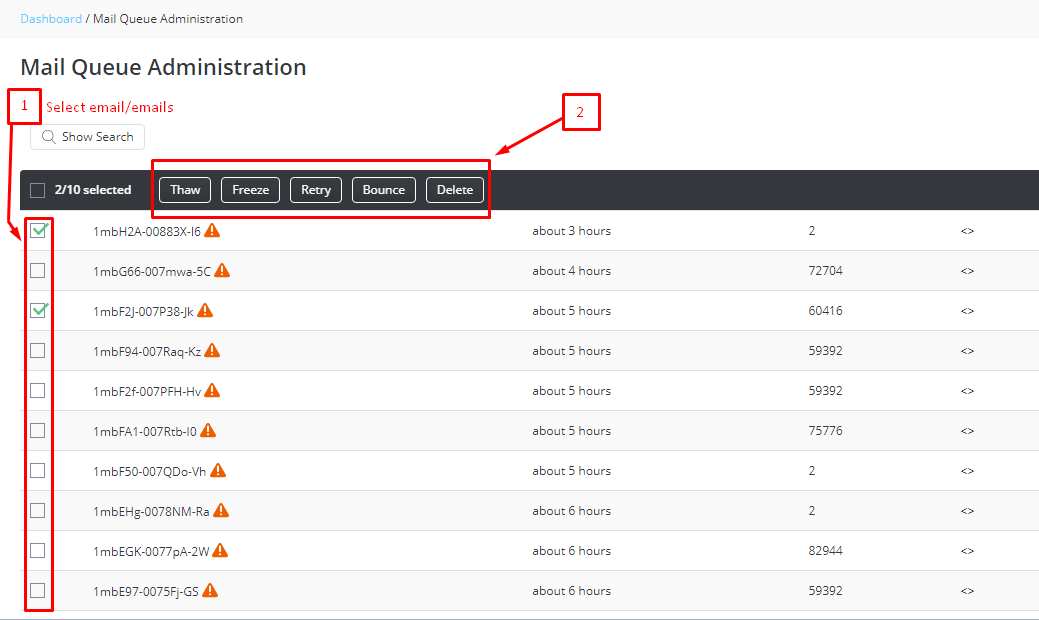
- You see a list of waiting messages. Each row shows the sender, the receiver, the size and the age.
Take action
For each message, pick one of these:
- View the details or headers to learn why it is stuck.
- Retry or Deliver to try sending again now.
- Delete to remove a message.
To clear many at once, tick the boxes and apply the action. Some versions let you delete the whole queue.
Command line option (root access needed)
DirectAdmin uses Exim to send mail. Exim is the mail-sending program. Connect with SSH as root and use these commands.
exim -bpcThis prints how many messages are in the queue.
exim -bpThis lists the messages with their IDs.
exim -qffThis tries to send all queued messages, including frozen ones.
exim -Mrm MESSAGE_IDThis removes one message. Replace MESSAGE_ID with an ID from the list.
Why does a queue grow?
- A hacked account or a weak password.
- A website form sending spam.
- The receiving server blocking your IP address.
- Wrong DNS settings, such as missing SPF or DKIM.
Quick recap
- The mail queue holds outgoing emails waiting to be sent.
- Admins use Mail Queue Administration to view, retry or delete.
- Root users can use Exim commands.
- A very large queue often means spam or a hacked account.