

How does it work?
DirectAdmin has a built-in Message System. When you send a message, it lands in each user's panel as a notice. It can also be sent to their email address. A user here means one hosting account owner.
Admins can write to resellers and users. Resellers can write only to their own users.
Before you send
- Read your text twice. You cannot take a sent message back.
- Keep it short and clear. Say what is happening, when, and what users need to do.
- Do not include passwords or other private details.
Steps
- Log in to DirectAdmin as Admin or Reseller.
- Open Message System. Use the search box if you cannot find it.
- Click Send Message.

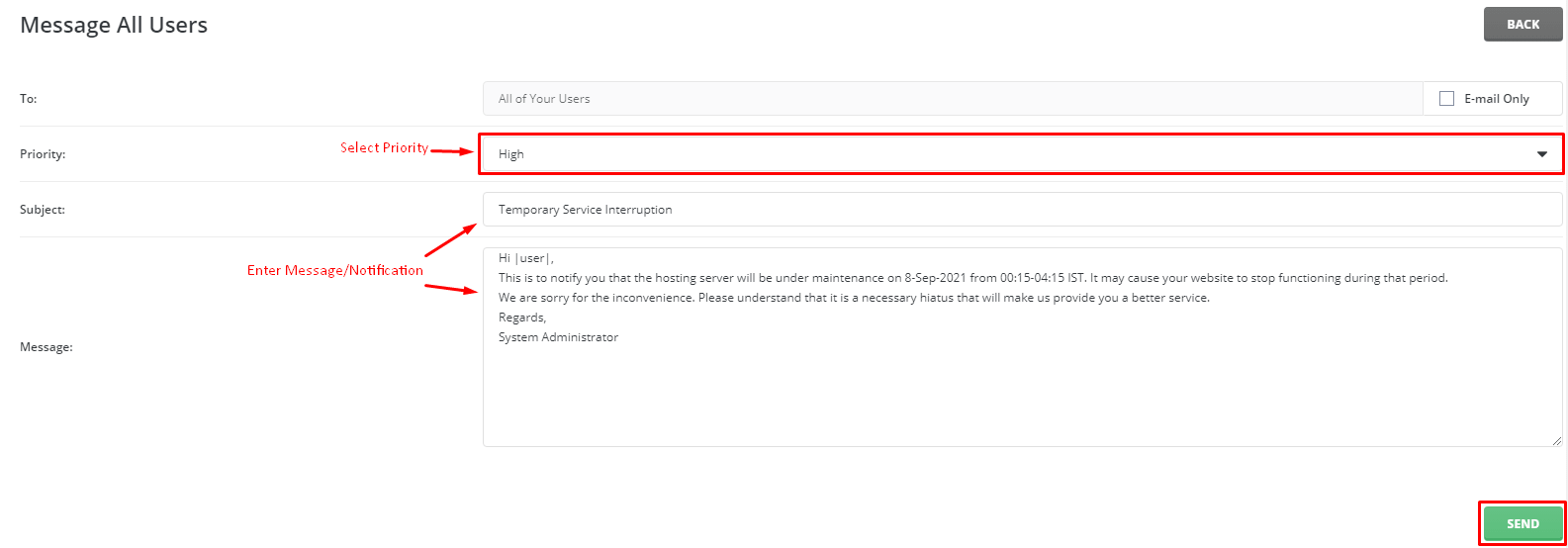
- Choose who gets it. Pick the option for All Users. You may also be able to pick all resellers, or one chosen group.
- Type a clear Subject. Example: "Planned maintenance on Saturday".
- Write your text in the message box.
- If you see a choice to send by email too, tick it so users see it outside the panel.
- Click Send.
- Look for the success note on the page.
Check what you sent
Go back to the Message System page. Open the list of sent messages. You will see the subject and the date.
Sample message
Subject: Planned maintenance on Saturday

Hello,
We will update the server on Saturday between 2 AM and 4 AM.
Your websites may be offline for a few minutes.
No action is needed from you.
Thank you.
This is a simple pattern: what, when, and what to do.
Tip: Menu names can differ between DirectAdmin versions. If you see no Message System, the feature may be off. Ask Hostvento support.
Quick recap
- Use Message System, then Send Message.
- Choose All Users as the audience.
- Write a short subject and a clear message.
- Tick the email option if offered, then click Send.