

What is a vacation message?
When someone emails you, the server answers on its own. It sends a short note, such as "I am away until Monday." This is also called an auto-reply or an out-of-office message. It works even when your computer is off, because the server does the job.
The server usually sends the reply only once to each sender in a short time. That stops endless loops.
Steps to create one
- Log in to DirectAdmin.
- Open Vacation Messages. It is under E-mail Manager. Use the search box if you cannot see it.

- Click Create Vacation Message.

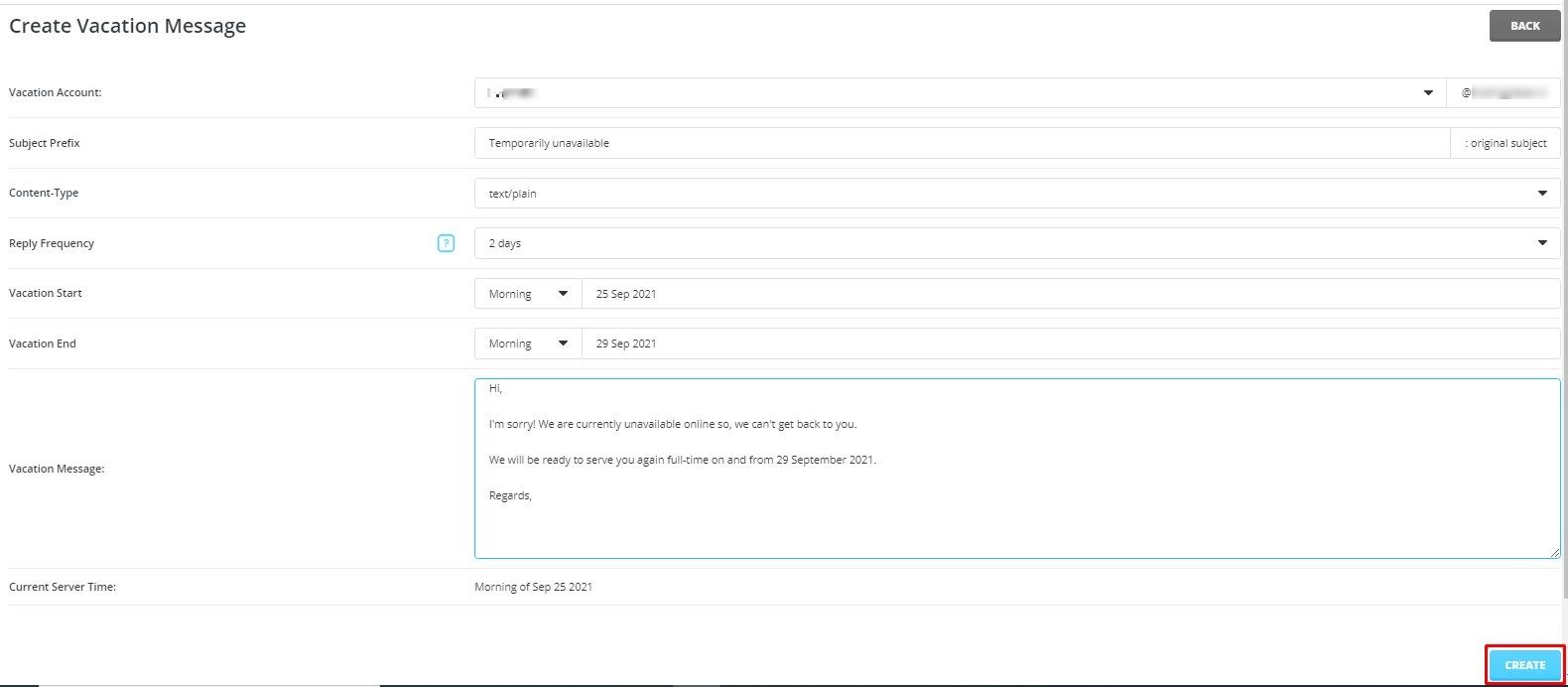
- Choose the email account from the drop-down list.
- Set the start date and the end date. The message turns on and off by itself. Some versions let you set the time too.
- Type your message in the text box.
- Click Create.
What to write
Keep it short. Say you are away, when you return and who to contact. Do not share your travel plans or private details. Strangers and spammers may read it too.
Hello,
Thank you for your email.
I am away until 15 June and will reply when I am back.
For urgent matters, please write to support@example.com.
Regards,
Sam
Use a real address of your own in the place of the example.
Edit or remove it
- Go back to Vacation Messages.
- Find the message in the list.
- Click Modify to edit it, or tick it and click Delete to remove it.
Test it
- Send an email to that address from a different account.
- Wait a few minutes.
- Check for the automatic reply.
Tip: Test from an address outside your own domain. Some servers skip replies to the same domain. Also check that the mailbox is not full.
Quick recap
- A vacation message is an automatic reply sent by the server.
- Open Vacation Messages, choose the account and dates, and write the text.
- Keep the note short and private details out.
- Delete the message when you are back, if it does not end by itself.