

What is a log?
A log is a diary kept by your server. Every time something happens, the server writes a line. For example, it notes when a visitor opens a page or when an error occurs. Reading the diary helps you find problems.
What is the Log Viewer?
DirectAdmin is a control panel. That is a web page for managing hosting. The Log Viewer is a tool inside it. It lets you read logs in your browser. You do not need special software.
The Log Viewer on the Admin level needs Admin access. Users may see only logs for their own site. The tool names can vary by DirectAdmin version.
Steps
- Log in to DirectAdmin. Your login details are in your welcome email.
- Find the Extra Features or System Info & Files section. The place depends on your version and skin.

- Click Log Viewer. If you do not see it, try the search box at the top of the page.
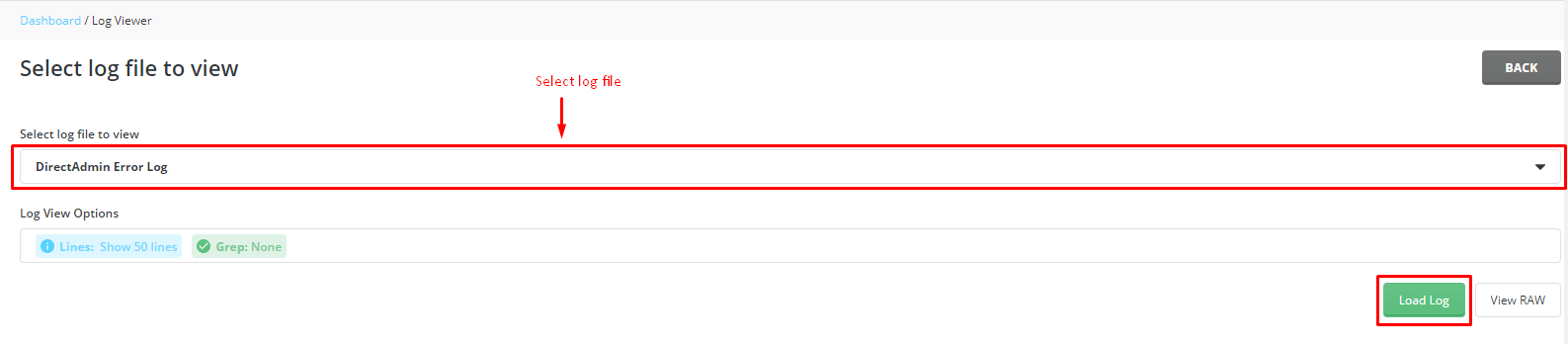
- Pick a log from the list. Common ones include error logs and access logs.
- Choose how many lines you want to see. A smaller number loads faster.
- Click View. The lines appear on the screen.
Common logs
| Log | What it tells you |
|---|---|
| Error log | Problems on your website, like a broken script |
| Access log | Who opened which page, and when |
| Mail log | Emails sent and received |
How to read a line
Each line starts with a date and time. Then comes the message. Look for words like error, failed, denied or not found. These point to the problem. The newest lines are usually at the bottom.
If the Log Viewer is missing
Your plan may not include it. It may also be switched off by the server owner. Ask Hostvento support if it is available for you.
Quick recap
- A log is a diary of what your server did.
- Open Log Viewer inside DirectAdmin.
- Pick a log and click View.

- Look for words like error or failed.
- Share the exact line with support if you need help.