

What does this error mean?
When you send an email, your mail program talks to a mail server. They follow set steps, like a polite conversation. This language is called SMTP. First your program says who the email is from. Then it says who it goes to. That "who it goes to" step is the RCPT command. RCPT is short for recipient. Only then does it send the message body, which is the DATA command.
The error means the server never got a valid recipient. So it refused to take the message.
Common causes
- The recipient address is missing or typed wrongly.
- The recipient address has a space or a strange character.
- The server rejected the recipient, for example because the domain does not exist.
- Your mail program is not logged in, so the server will not relay. Relaying means passing mail on for someone.
- A website contact form or script sends mail with an empty "To" field.
Steps to fix it in an email program
- Look at the address in the To box. Check the spelling and the part after the @ sign.
- Remove any spaces or commas that do not belong.
- Send a test to a different address, for example your own.
- Open your account settings. Check that Outgoing server (SMTP) needs authentication. Turn on "My outgoing server requires authentication".
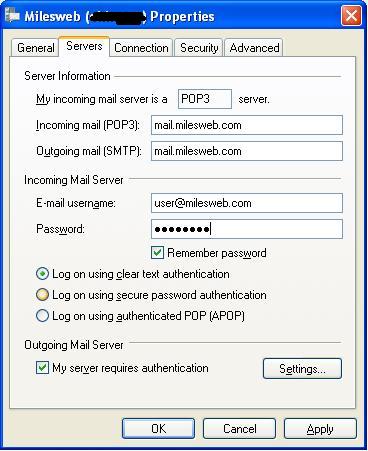
- Use the same username and password as your incoming mail.
- Check the SMTP port and security type. Your welcome email or Hostvento support can tell you the right ones.
- Try sending again.
Steps to fix it on a website
- Open the form or plugin settings that send mail.
- Check that the "send to" address is filled in and correct.
- Use a real email address from your own domain as the sender.
- If you use a mail plugin, set it to use SMTP with a real mailbox login.
- Send a test.
Tip: Read the mail log if you can. In cPanel, Track Delivery shows what happened to each message.
Still failing? Open a support ticket. Tell us the exact error, the time and the address you used.
Quick recap
- The server did not get a valid recipient before the message.
- Check the To address first.
- Turn on SMTP authentication in your mail program.
- For websites, check the form's send-to address and use SMTP.