

What is an email forwarder?
An email forwarder is like mail redirection at the post office. When someone writes to one address, the mail also goes to a second address. For example, mail sent to sales@example.com can arrive in your personal inbox. You do not need to check many mailboxes.
Webuzo is a control panel. It is a web page where you manage your hosting and your email.
Steps
- Log in to Webuzo. Your welcome email has the address and login. You can also check the Services menu in your client area.
- Open the Email section, or type Forwarders in the search box.
- Click Email Forwarders.
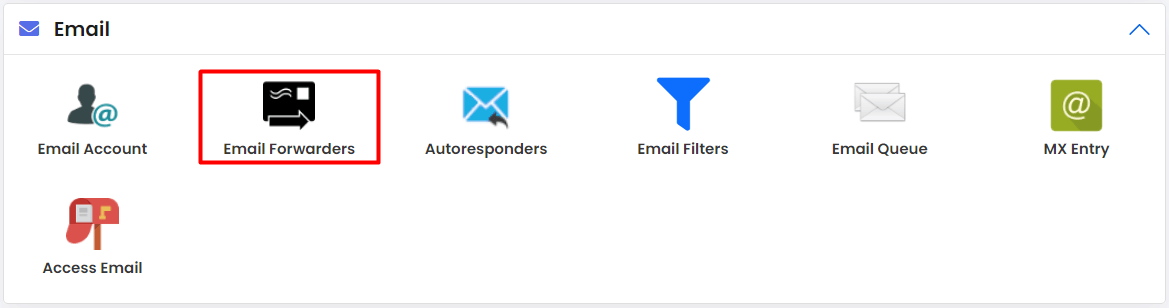
- Click Add Forwarder.
- In the first box, type the name before the @ sign. This is the address that will receive the mail, for example
sales. - Choose the domain from the list.
- In the destination box, type the address that should get the copy. For example,
myname@gmail.com. - Click Add or Create.

- Look for the success message.
Test it
- Send an email to the first address from a different account.
- Open the destination inbox.
- Check the spam folder if it does not show up in a few minutes.
Remove a forwarder
- Go back to Email Forwarders.
- Find the forwarder in the list.
- Click Delete or the bin icon.
- Confirm.
Things to know
- The address you forward from may not need a real mailbox. A forwarder alone can work.
- Do not forward address A to B and B back to A. This makes a loop. Mail will bounce again and again.
- Some mail services mark forwarded mail as spam. Ask recipients to check their junk folder.
- Only forward to addresses you control, or where the owner agrees.
Tip: To keep a copy in both mailboxes, make sure the original mailbox exists and that your version of Webuzo keeps a copy. If you are unsure, ask support.
Menu names can differ between versions. If you are stuck, open a support ticket.
Quick recap
- A forwarder sends mail from one address to another.
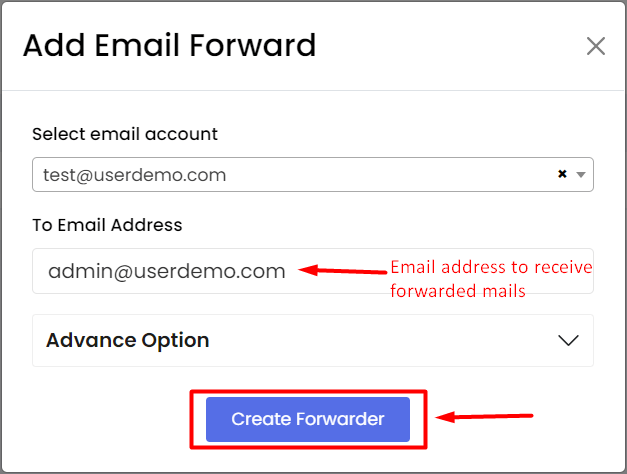
- Use Email then Email Forwarders in Webuzo.
- Fill in the source address and the destination.
- Avoid loops and test with a message.