

What is SMTP?
SMTP stands for Simple Mail Transfer Protocol. It is the system that sends your email out. Think of it as the post office van that carries your letter. A "server" is a computer that is always on and does a job for you.
The settings you need
| Setting | What to enter |
|---|---|
| Outgoing server | Often mail.yourdomain.com. Check your welcome email to be sure. |
| Username | Your full email address |
| Password | The password of that email account |
| Port | 465 with SSL, or 587 with TLS |
| Authentication | On (required) |
A port is like a door number on the server. SSL and TLS are ways of locking your mail while it travels, so others cannot read it.
Steps
- Open your email program, such as Outlook, Thunderbird or a phone mail app.
- Go to the account settings. Look for Add account or Account settings.
- Choose to set up the account by hand. This may be called Manual setup or Advanced.
- Find the Outgoing mail server (SMTP) section.
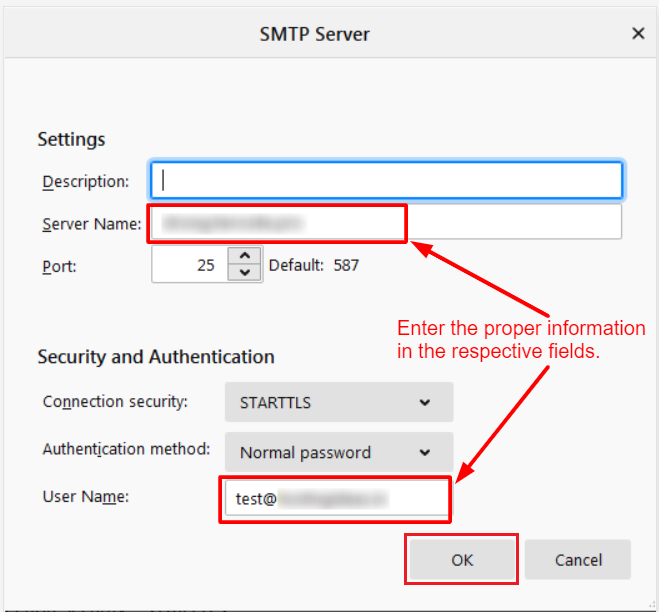
- Enter the server name from your welcome email.
- Choose the port. Try 465 with SSL/TLS, or 587 with STARTTLS.
- Turn on My outgoing server requires authentication. This means the server asks for your login before sending.
- Enter your full email address and password.
- Save the settings.
- Send a test email to yourself or a friend.
Find the exact values in cPanel
- Log in to cPanel and open Email Accounts.
- Click Connect Devices next to your email address.
- Read the section named Mail Client Manual Settings.
It shows the server name and ports for your account.
If sending fails
- Check the password and the full email address.
- Try the other port.
- Some home internet providers block port 25. Use 465 or 587 instead.
- Still stuck? Open a ticket at Hostvento support.
Tip: Use the server name from your welcome email. It is the safest choice.
Quick recap
- SMTP sends your email.
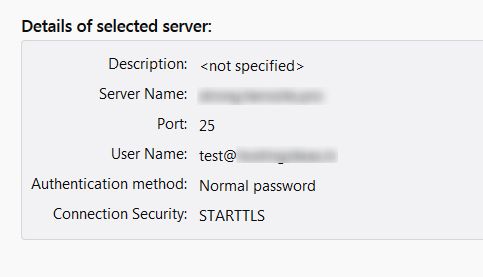
- You need a server name, port, username and password.
- Turn on authentication and use SSL or TLS.
- cPanel shows the exact settings under Connect Devices.