

What is email forwarding?
Forwarding means that mail sent to one address is also delivered to another. It is like a post office that sends a copy of your letters to a second home. A forwarder is the rule that does this. cPanel is the control panel where you set it.
Method 1: Add a forwarder for each person
cPanel makes one forwarder per destination. To reach many people, make one forwarder for each address.
- Log in to cPanel.
- Open Forwarders in the Email section.
- Click Add Forwarder.
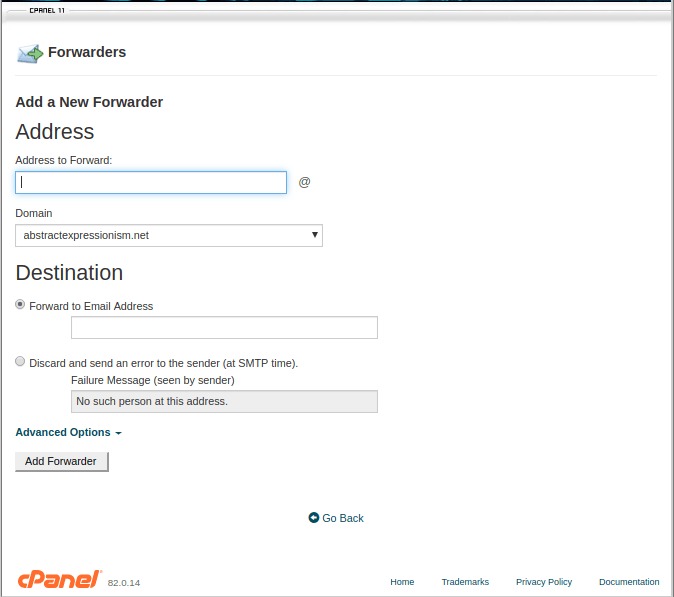
- In Address, type the name before the @, for example
sales. - Choose your domain in the Domain list.
- In Destination, choose Forward to Email Address.
- Type the first target address, for example
anna@example.com. - Click Add Forwarder.
- Repeat steps 3 to 8 for each other person, using the same Address.
Now mail sent to sales@yourdomain.com reaches everyone you added.
Method 2: Use a mailing list
If the group is big, a mailing list is better. It is one address that sends to a saved group of people. Open Mailing Lists in cPanel and add the members there.
Method 3: One address to many with a pipe or script
This is advanced and not needed for most people. Use the methods above first.
Test it
- Send an email to the forwarded address from another account.
- Ask each person to check their inbox and spam folder.
Stop forwarding
- Open Forwarders again.
- Find the row you no longer need.
- Click Delete and confirm.
Note: Deleting a forwarder only stops the copy. It does not delete any mail.
Tip: If the forwarded mail goes to spam, ask the receivers to mark it as "not spam". Forwarded mail is sometimes flagged by big mail services.
Quick recap
- A forwarder sends a copy of mail to another address.
- Add one forwarder for each person, with the same source address.
- Use a mailing list for larger groups.
- Test it and delete forwarders you do not need.