

What is a mailing list?
A mailing list is one email address that sends your message to many people. Mailman is a free program that runs mailing lists. A moderator is a person who checks messages before they go out. This check is called moderation.
Sometimes Mailman holds a message. The message waits until the moderator says yes. If you do not need this, you can turn it off. Do it only when you trust the people who post. Without moderation, anyone allowed to post can send spam to the whole list.
Warning: If a list is open to everyone, turning off moderation will let spam in. Check who may post first.
Steps
- Open the Mailman admin page of your list. The link is in the email you got when the list was made. You can also open it from your hosting control panel.
- Enter the list password and log in.
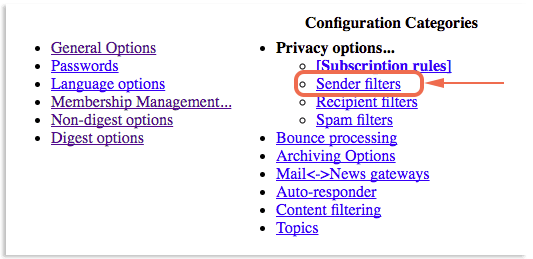
- Click Privacy options in the menu at the top.
- Click Sender filters.
- Find the setting default_member_moderation. Set it to No. This means list members are not moderated by default.
- Find member_moderation_action. If it says Hold, change it to Accept if you wish.
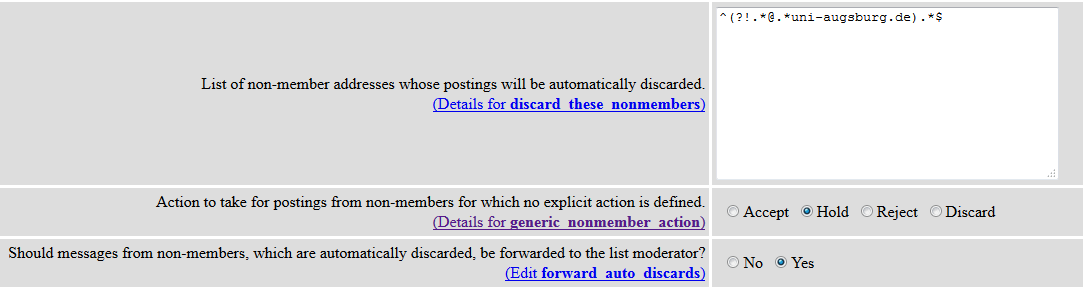
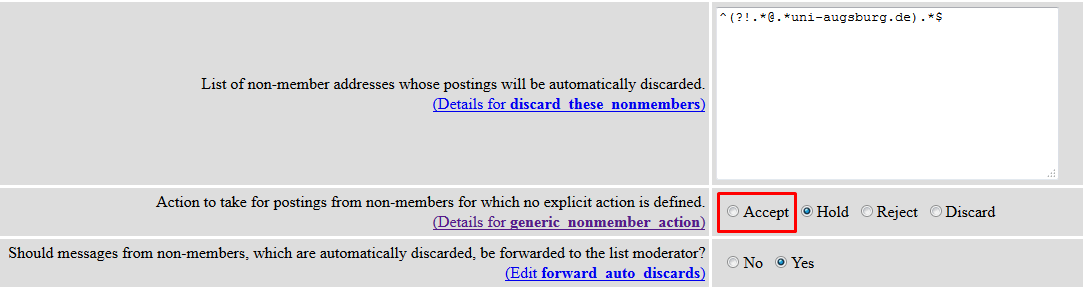
- Find generic_nonmember_action. This decides what happens to mail from people who are not on the list. Choose Accept, Hold, Reject or Discard. Hold keeps it for approval. Accept lets it through.
- Scroll to the bottom and click Submit Your Changes.
- Now fix members who were already marked as moderated. Go to Membership Management and then Membership List.
- Clear the mod box next to each person. Then click Submit Your Changes.
- Send a test message from a member address. It should arrive without waiting.
Tip: Menu names can look a little different between Mailman versions. Look for words like Privacy, Sender and Moderation.
Quick recap
- Moderation holds messages until a person approves them.
- Use Privacy options, then Sender filters, to change it.
- Also clear the mod box for existing members.
- Only turn it off for people you trust.