

What is a default address?
A default address is also called a catch-all. Imagine a mailbox at the front door that takes any letter with a wrong name. If someone writes to typo@yourdomain.com and no such mailbox exists, the default address decides what happens. cPanel is the control panel for your hosting.
The default can send the mail to a real mailbox, forward it, or reject it. Rejecting is usually the safest choice. A catch-all can fill up with spam.
Warning: A catch-all may collect a lot of junk mail. Think before you turn it on.
Steps
- Log in to cPanel from your client area or with the link in your welcome email.
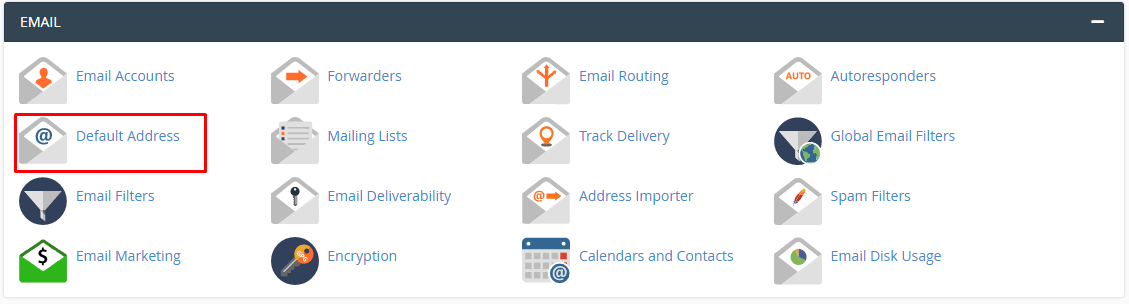
- In the Email section, click Default Address. On some versions it is named Default Address Settings.
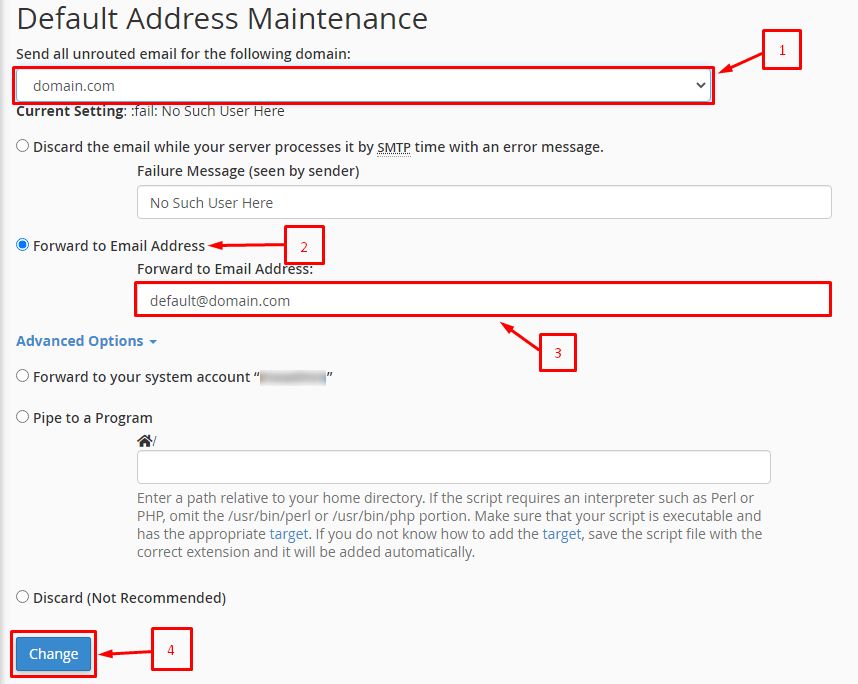
- Choose your domain from the list at the top.
- Pick one of the options:
- Forward to email address sends the mail to an address you type.
- Forward to system account sends it to the main account mailbox.
- Discard with error to sender (recommended) rejects the mail and tells the sender it failed.
- Discard drops the mail without a message.
- If you chose to forward, type the address or account name.
- If you chose to reject, you may type a short error message, such as "No such address here".
- Click Change.
- You will see a message that the default address was changed.
Test it
- From another email account, send a message to a made-up address on your domain.
- Check that it goes where you chose, or that you get a rejection notice.
Tip: Choose the reject option to keep spam low. Use a normal forwarder for important names instead.
Quick recap
- The default address handles mail sent to unknown names.
- Find it under Email, then Default Address.
- Forward, reject or discard the mail.

- Rejecting is the safest choice.