

What does this error mean?
FTP stands for File Transfer Protocol. It is a way to send files between your computer and your website, like a delivery truck. A program called an FTP client (for example FileZilla) drives the truck.
The number 530 is a code from the server. It means "you are not logged in". The server did not accept your login details.
Common causes
- The username or password has a typing mistake.
- The username is missing the full form. In cPanel, extra FTP users often look like
name@yourdomain.com. - The password was changed, but the FTP client still uses the old one.
- The FTP account was deleted.
- Your IP address was blocked after too many wrong tries.
- The account is suspended.
Steps to fix it
- Read your details again. Check the host, username and password. Your welcome email from Hostvento has the main details.
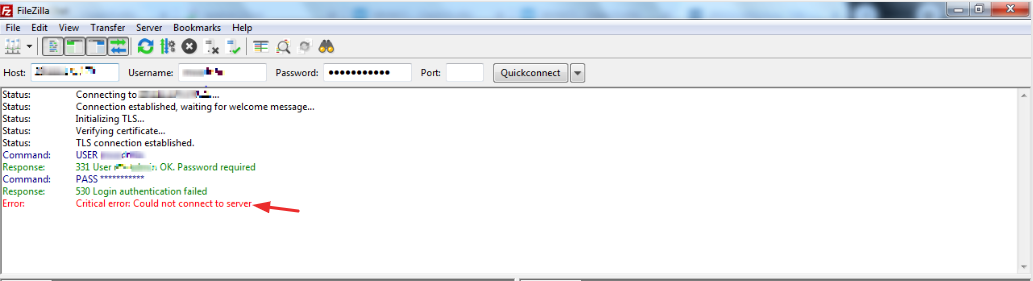
- Type the password by hand. Do not copy it. Copying often adds a hidden space at the end.
- Check upper and lower case letters. Passwords care about this.
- Use the full username, such as
name@yourdomain.com. - Log in to cPanel. Open FTP Accounts. Confirm the account exists.
- Click Change Password beside the account. Set a new strong password. Save it.
- Update the password in your FTP client. Try again.
- Check the port. Plain FTP uses port 21. SFTP uses port 22. Choose the one that matches the protocol in your client.
Tip: If you see the error again and again, wait about 30 minutes. A security tool may have blocked your IP address for a short time.
Still stuck?
Check your client area to make sure your service is active and your invoices are paid. If the login still fails, open a support ticket. Tell us your username, the time of the error and your public IP address. Never send your password in a ticket.
Quick recap
- 530 means the server refused your login.
- Check the username, password and port first.
- Use the full FTP username.
- Reset the password in cPanel if needed.
- Contact support if the problem stays.