

What is a bot and what is robots.txt?
A bot is a program that visits websites on its own. Search engines like Google use bots to read pages. Some bots are helpful. Others waste your server's power or copy your content.
robots.txt is a plain text file at the top of your website. Bots read it first. It is like a sign on a door that says "please do not enter this room". Good bots obey the sign. Bad bots may ignore it, so it is not real security. It is a polite request.
Steps
- Log in to cPanel.
- Open File Manager in the Files section.
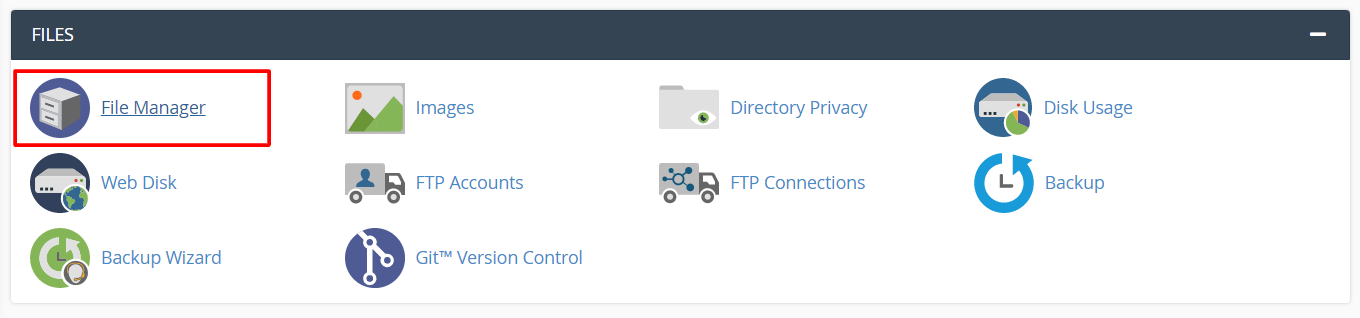
- Open the
public_htmlfolder. The file must sit here, in the main folder of the site. - Look for an existing
robots.txt. If one exists, right-click it and choose Copy to save a backup. Then right-click and choose Edit. - If none exists, click + File, type
robots.txtand click Create New File. Then right-click it and choose Edit.
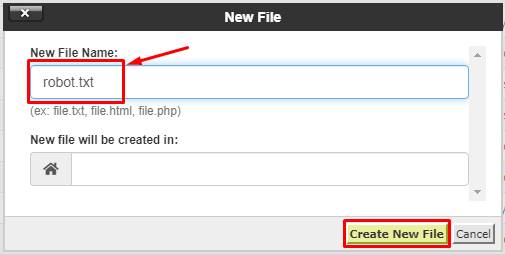
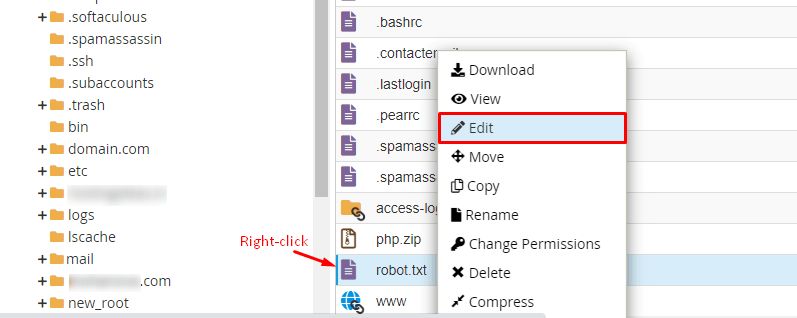
- Type your rules. Examples are shown below.
- Click Save Changes.

- Test by opening your site address followed by
/robots.txt.
Example rules
Block one bot from the whole site. Replace the name with the bot's real name:
User-agent: BadBot
Disallow: /
This tells the bot called BadBot to stay out of everything.
Block all bots from one folder:
User-agent: *
Disallow: /private/
The star means every bot. This asks them to skip the /private/ folder.
Allow everything:
User-agent: *
Disallow:
Warning: Disallow: / for all bots (User-agent: *) hides your whole site from search engines. Your site may vanish from Google. Use it only on a test site.
For help, open a support ticket.
Quick recap
- robots.txt is a polite sign for bots.
- Create it in
public_htmlusing File Manager. - Use
User-agentto name the bot andDisallowto set the blocked path. - Do not block everything by mistake.
- Bad bots may ignore it.