

Why change an FTP password?
FTP is a way to send files between your computer and your website. Each FTP account has a username and a password. The password is like a house key. Change it if you forgot it, if a worker left your team, or if you think someone else knows it.
Webuzo is a control panel. It is a web page where you manage your hosting. Ask Hostvento support if it is part of your plan.
Steps
- Log in to your Webuzo panel.

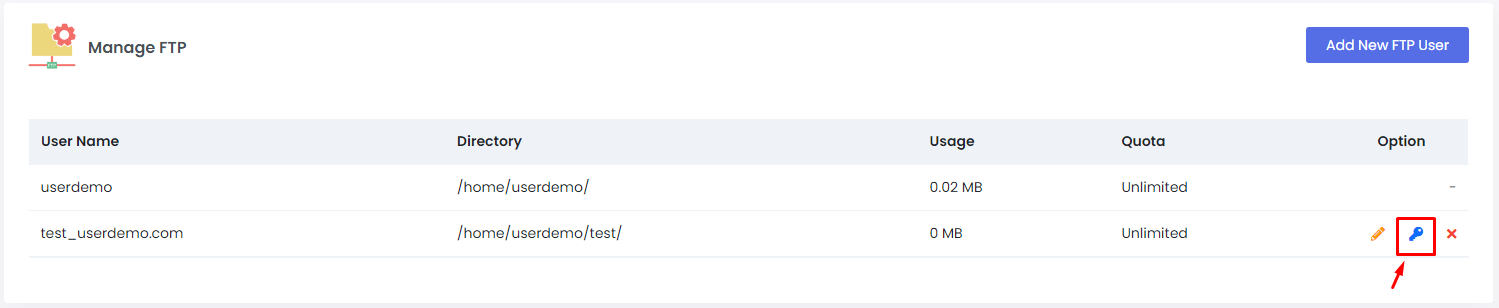
- Open FTP Accounts. Use the search box and type "FTP" if you cannot find it.
- Find the account in the list.
- Click the Edit icon beside it.
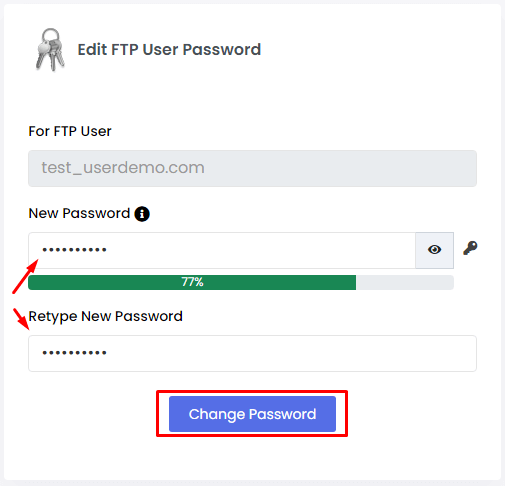
- Type the new password in the Password box. Some versions ask you to type it twice.
- Click Save or Update.
- Wait for the green success message.
- Open your FTP program, such as FileZilla.
- Edit the saved connection and enter the new password.
- Connect to test it.
Tip: Webuzo menu names can differ slightly by version. Look for the edit or password option next to the account.
How to make a strong password
- Use at least 12 characters.
- Mix capital letters, small letters, numbers and symbols.
- Do not use your name, birthday or the word "password".
- Use a different password for each account.
- A password manager can store them for you.
If the new password does not work
- Type it again by hand. Do not paste it with extra spaces.
- Check that the FTP program saved the new password.
- Confirm the username is correct.
- If it still fails, open a support ticket.
Never send your password in a ticket or by email. You can also check your services in the client area.
Quick recap
- Open FTP Accounts in Webuzo.
- Edit the account and type a new password.
- Save it.
- Update the password in your FTP program.
- Use a long, strong password.