

What is Webuzo?
Webuzo is a control panel. A control panel is a web page where you manage your hosting, like the dashboard of a car. Some hosting plans use Webuzo and some use cPanel. Ask Hostvento support if Webuzo is on your plan.
FTP is a way to move files between your computer and your website. An FTP account is a username and password that allows this. You can give each person or tool their own login.
Steps
- Log in to your Webuzo panel. Your welcome email has the address and login details.
- Find the FTP Accounts option. It sits in the menu on the left or on the main screen. You can also use the search box and type "FTP".
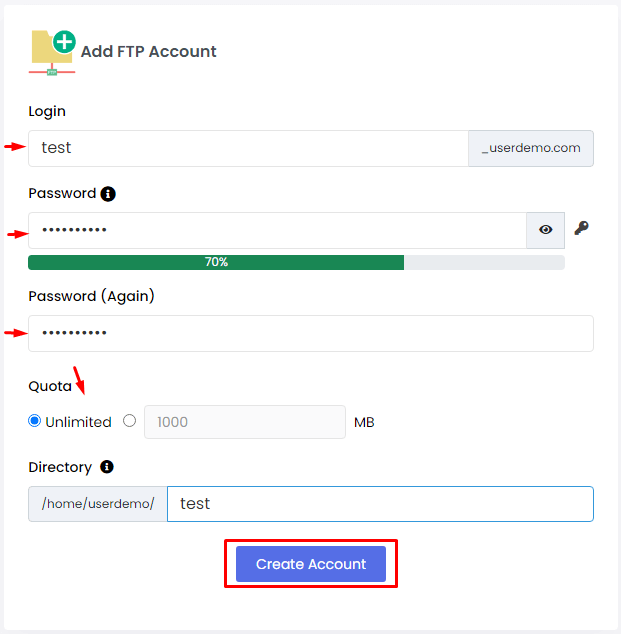
- Click the button to add a new account. It is often called Add FTP Account or Create.

- Type a Username. Use short, simple letters, such as
designer1. - Type a Password. Make it long. Mix letters, numbers and symbols. Use the password generator if you see one.
- Choose the Directory. This is the folder the user may open. Leave it as the main web folder for full access. Pick a smaller folder to limit the user.
- Set the Quota if the form shows one. A quota is a size limit for the account.
- Click Create or Submit.
- Check the list. Your new account should now show.
Tip: Menu names can differ a little between Webuzo versions. Use the search box if you cannot find an item.
Connect with the new account
Open an FTP program such as FileZilla. Enter these details:
- Host: your domain name or the server address from your welcome email.
- Username: the one you made.
- Password: the one you set.
- Port: 21 for FTP.
If you cannot connect, open a support ticket.
Keep it safe
- Do not share the main account password. Make a separate FTP account instead.
- Delete accounts you no longer use.
Quick recap
- Open FTP Accounts in Webuzo.
- Add a username, a strong password and a folder.
- Save it and test the login in an FTP program.
- Remove old accounts to stay safe.