

What is a quota?
A quota is a size limit. Think of a school locker that fits only so many books. An FTP account with a quota can store files only up to that size. Some people call it a memory quota, but it limits disk space, not computer memory.
Webuzo is a control panel, a web page for managing your hosting. Ask Hostvento support whether it is on your plan.
An FTP account is a login that lets a person send files to your website.
Steps
- Log in to your Webuzo panel.
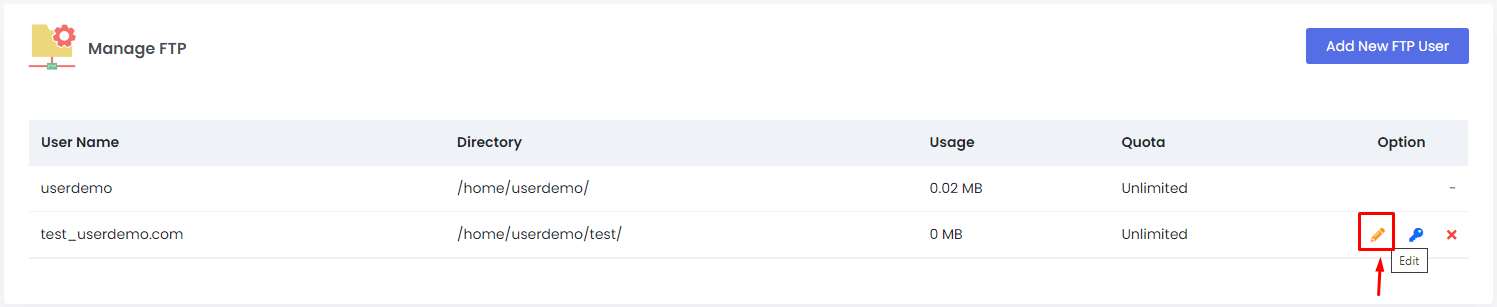
- Open FTP Accounts. Use the search box if you cannot see it.
- Look at the list of accounts.
- Find the account you want to change.

- Click the Edit icon or button beside it.
- Find the Quota box.
- Type the new size. The unit is usually megabytes, shortened to MB. Check the label next to the box.
- Click Save or Update.
- Check the list again. The new quota should show.
Tip: If the page has an Unlimited option, the account can use any space left in your plan. Use it with care.
Good to know
- The quota cannot create new space. Your hosting plan has a total disk limit. All accounts share that space.
- If you set a quota lower than the files already stored, the user may not be able to upload more. Old files stay, but new uploads can fail.
- If uploads fail with a "disk quota exceeded" message, raise the quota or delete files you do not need.
- Menu names may differ slightly between Webuzo versions.
Warning: before you delete files to free space, take a backup. Deleted files are hard to get back.
You can check your plan limits in the client area. If you do not see the Quota option or need help, open a support ticket.
Quick recap
- A quota is a size limit for one FTP account.
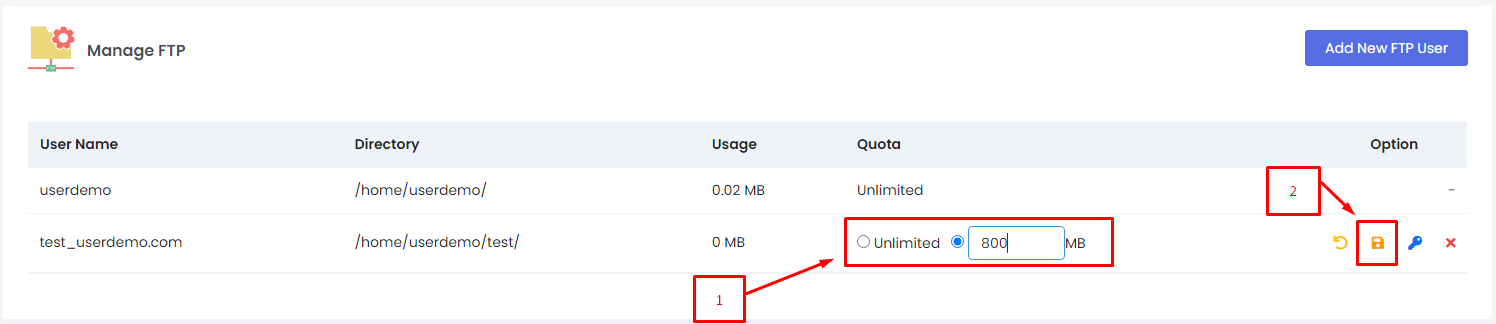
- Open FTP Accounts, then edit the account.
- Type a new quota and save.
- Your plan's total space still applies.
- Back up before deleting files.