

What is .htaccess?
.htaccess is a small settings file for websites on an Apache server. Apache is the program that serves web pages. This file can hold redirects, password rules and other settings. It is like a rule sheet pinned to the door of your website.
The file can contain private details. Visitors should never be able to read it. Most servers already block it by default. You can add an extra rule to be sure.
Warning: a mistake in .htaccess can take your whole site offline with a "500 Internal Server Error". Make a backup copy before you edit it.
Steps
- Log in to cPanel and open File Manager.
- Click Settings in the top right. Tick Show Hidden Files (dotfiles). Click Save. Files that start with a dot are hidden unless you do this.
- Open
public_html. - Find
.htaccess. Right-click it and choose Copy to make a backup, for example.htaccess-backup. - Right-click the real
.htaccessand choose Edit. - Go to the end of the file. Add these lines on a new line:
<Files ".htaccess">
  Require all denied
</Files>
This tells the server to refuse every web request for a file named .htaccess. Older servers use Order allow,deny and Deny from all instead. Try the first form and use the older one only if you see an error.
- Click Save Changes.
- Open your website in a browser. Check that it still loads.
- Type your site address followed by
/.htaccess. You should see "403 Forbidden". That means access is denied.
.htaccess.If you cannot fix it, open a support ticket.
Quick recap
- .htaccess holds server rules and should stay private.
- Show hidden files in File Manager, then back up the file.
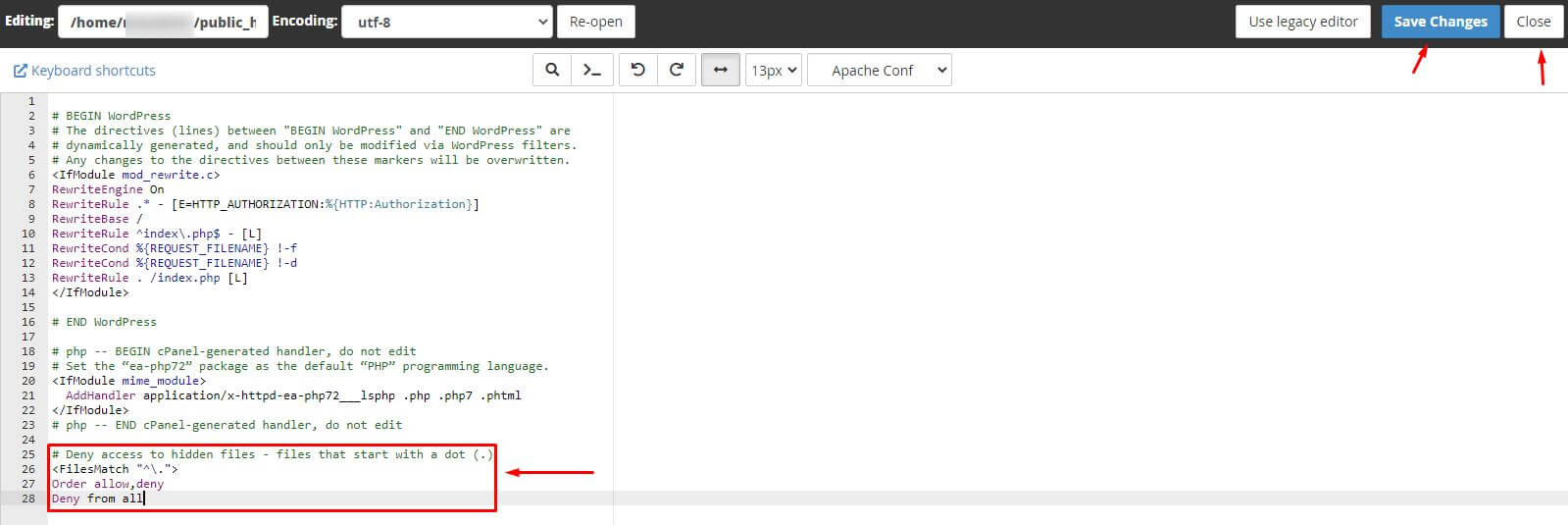
- Add the deny rule and save.
- Test the site and check that
/.htaccessgives 403.