

What is FTPS?
FTP is a way to send files between your computer and your website. Plain FTP sends everything as normal text. Anyone who listens on the network could read your password. It is like sending a postcard.
FTPS is FTP with a lock added. It uses TLS, a method that scrambles the data so only you and the server can read it. It is like sending a sealed letter instead of a postcard.
FileZilla is a free program that supports FTPS. You can download it from the FileZilla project's website.
Before you start
You need:
- Your FTP host name, user name and password. Look in your welcome email or in your FTP accounts area.
- A server that supports FTPS. Ask Hostvento support if your plan includes it.
Steps
- Open FileZilla.
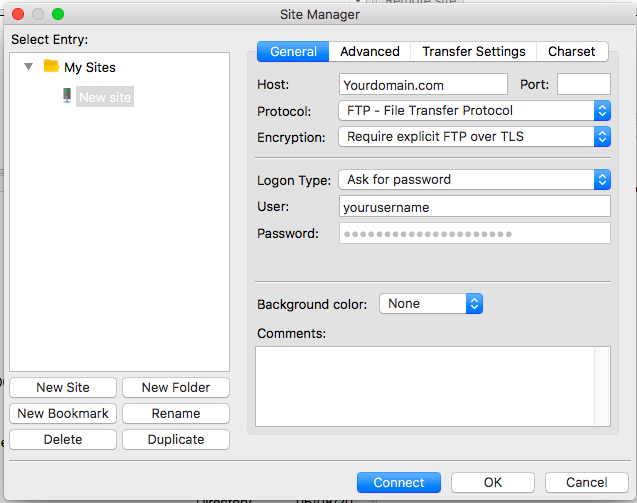
- Click File, then Site Manager.
- Click New Site and give it a name you will remember.
- In Protocol, choose FTP - File Transfer Protocol.
- Type your server name in Host.
- In Encryption, choose Require explicit FTP over TLS. This is the safest normal choice.
- In Logon Type, choose Normal.
- Type your User and Password.
- Leave the port empty or use
21. - Click Connect.
Trust the certificate
The first time, a window named Unknown certificate may appear. A certificate is like an ID card for the server. Read the details. If the host name matches your server, tick Always trust this certificate in future sessions. Click OK.
You are connected when the message list shows lines about TLS. Look for "TLS connection established".
If it does not connect
- Check the host name matches the one on the certificate.
- Try passive mode in Edit, Settings, Connection, FTP.
- Ask support whether your plan allows FTPS and which host name to use.
You can open a support ticket if you need help.
Quick recap
- FTPS is FTP protected by TLS encryption.
- In Site Manager, pick Require explicit FTP over TLS.
- Accept the certificate if the host name matches.
- Avoid plain FTP when you can.