

What SCP is
SCP (Secure Copy Protocol) copies files between two computers through an encrypted SSH connection. In the examples below, the SSH service on the remote server listens on port 2222. If your server uses the default port 22, leave out the -P 2222 part.
Before you start
Make sure the SSH service runs on the server you copy to:
sudo systemctl status ssh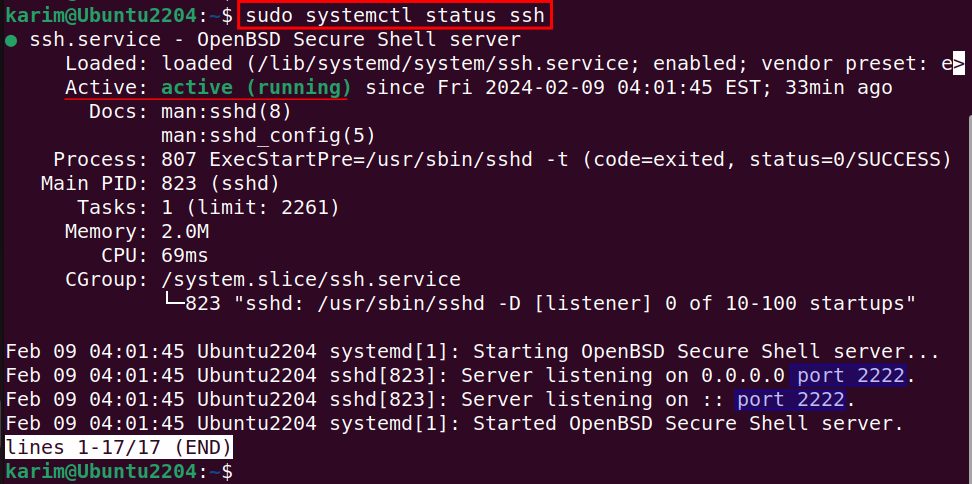
Copy one file
scp -P 2222 ~/Documents/backup-folder/file.txt user@server_IP:~/Downloads
What each part means:
-P 2222is the SSH port of the remote server (a capital P).~/Documents/backup-folder/file.txtis the file on your computer.user@server_IPis the login on the remote server.:~/Downloadsis the folder on the remote server.
Copy several files
Move to the folder first, then list the files:
cd ~/Documents/backup-folder/
scp -P 2222 file.txt image.jpg user@server_IP:~/Downloads
Files from different folders work too:
scp -P 2222 ~/Documents/backup-folder/file.txt ~/Documents/sample.doc user@server_IP:~/Downloads
Copy a whole folder
Add -r (recursive):
scp -r -P 2222 ~/Documents/backup-folder user@server_IP:~/Downloads
Check the result
List the files on the remote server:
ssh user@server_IP -p 2222 "ls -l ~/Downloads/"
Download from the server
Reverse the order to copy a file to your computer:
scp -P 2222 user@server_IP:~/Downloads/file.txt ~/Documents/Tip: For large or repeated transfers,
rsync over SSH is often faster because it sends only what changed.Quick recap
scp -P port file user@host:/pathcopies a file.- Add
-rfor folders. - Use
ssh ... "ls"to confirm the copy.