

What is CSF?
A firewall is a guard that decides which connections may reach your server. CSF is ConfigServer Security and Firewall, a popular firewall for Linux servers. It works with WHM and cPanel, the control panels for server owners and website owners.
An IP address is a number that identifies a computer on the internet. CSF has a login watcher called LFD. LFD blocks an IP address after too many failed logins. Sometimes it blocks a good address, like yours.
Remove an IP in WHM
- Log in to WHM as
root. - Type
CSFin the search box on the left. - Click ConfigServer Security & Firewall.
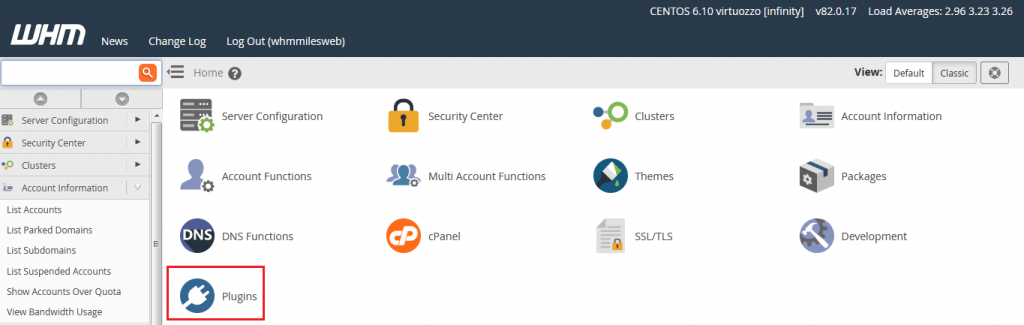
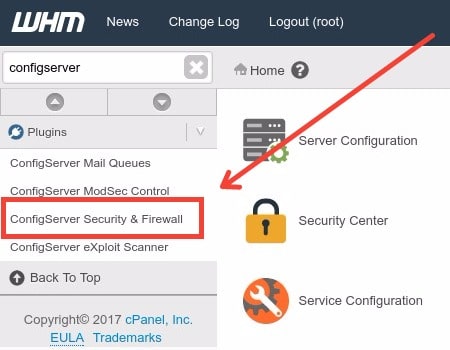
- Find the box named Quick Unblock.
- Type the IP address into the box next to Quick Unblock.
- Click Quick Unblock beside the box.
- CSF shows a message that the address was removed.
You can also click Firewall Deny IPs to open the block list file. Delete the line with the IP address and click Change. Then click Restart csf+lfd.
Remove an IP on the command line
- Connect to your server with SSH as root. SSH is a safe way to type commands on a server.
- Check if the address is blocked:
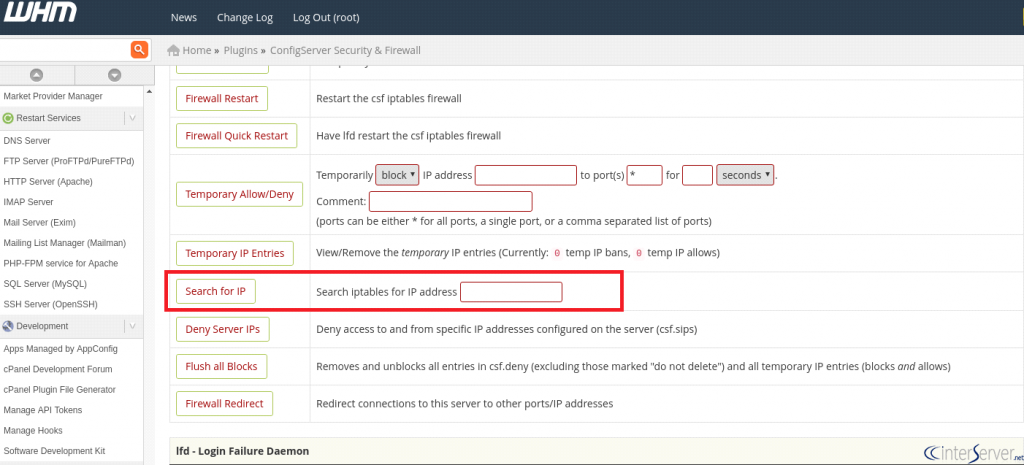
csf -g 203.0.113.5This searches the firewall rules for that address. Use the real IP address instead of the sample one.
- Remove it from the temporary and permanent lists:
csf -dr 203.0.113.5
csf -tr 203.0.113.5
The first command removes a permanent block. The second removes a temporary block.
- Check again with
csf -g. You should see no deny rule.
Stop it happening again
Add trusted addresses, like your office, to the allow list.
csf -a 203.0.113.5 "My office"This adds the address to the allow list with a note. In WHM, you can use the Quick Allow box.
On shared hosting you cannot use CSF yourself. Open a support ticket and send your IP address. Hostvento support can check it.
Quick recap
- CSF and LFD block IPs after failed logins or attacks.
- Use Quick Unblock in WHM.
- Or run
csf -drandcsf -tras root. - Add your own IP to the allow list.
- Check why it was blocked before unblocking.