

What they are
Environment variables are named values that change how an app behaves, without changing its code. In Docker you use them for database addresses, API keys, ports and modes such as development or production.
- Dynamic configuration. Change a setting without a rebuild.
- Clean code. Settings stay outside the source code.
- Per-environment values. Use different values for development, testing and production.
Docker sets some variables by itself, such as HOSTNAME. You add your own for your app.
Method 1: The -e flag
Add -e NAME=value to docker run:
sudo docker run -e DB_USER=root -e DB_PASSWORD=mysecretpassword -d mysql
The container sees DB_USER and DB_PASSWORD as variables. (The official MySQL image reads names such as MYSQL_ROOT_PASSWORD. Use the names that your image expects.)
Method 2: An .env file
A file keeps many variables in one place. Create .env:
DB_USER=root
DB_PASSWORD=mysecretpassword
Run the container with --env-file:
docker run --env-file .env -d mysql
Keep the file out of version control (add it to .gitignore).
Method 3: In a Dockerfile
Use ENV for values that are fixed in the image:
FROM mysql:latest
ENV DB_USER=root
ENV DB_PASSWORD=mysecretpassword
Build the image and run it:
sudo docker build -t mymysql .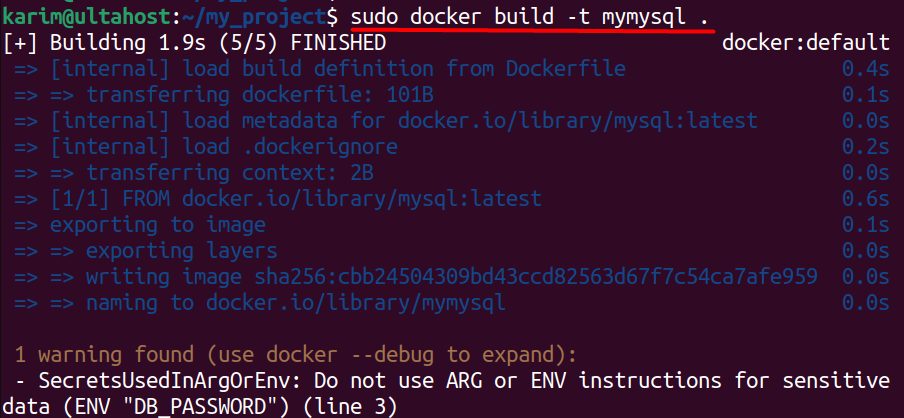
docker run -d mymysql
Warning: A value set with
ENV is stored in the image and anyone with the image can read it. Do not put real passwords in a Dockerfile.Method 4: Docker Compose
services:
  db:
    image: mysql:latest
    environment:
      - MYSQL_ROOT_PASSWORD=mysecretpassword
    env_file:
      - .env
Check the values
docker exec <container_name> envWhere they help
- Simple configuration. One image works everywhere with different settings.
- Environments. Switch between development, testing and production by changing the variables only.
- Safer secrets. Keep passwords out of the code. For production, use Docker secrets or a secrets manager.
Quick recap
- Use
-efor a few values and--env-filefor many. - Use
ENVonly for non-secret defaults. - Never commit secrets to Git.