

What is website traffic?
Traffic means the visits to your site. Each time someone opens a page, your server writes a note. cPanel reads those notes and turns them into charts and tables. You do not need to add any code.
Steps
- Log in to cPanel. The link and details are in your welcome email.
- Scroll to the Metrics section.
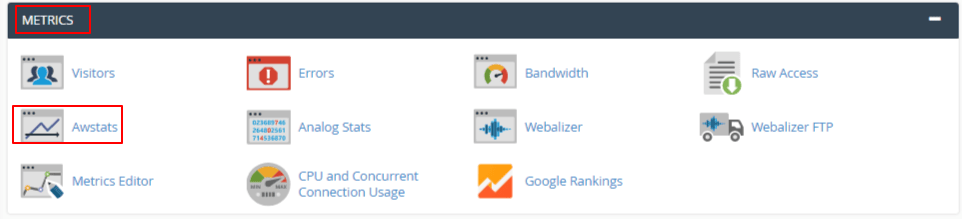
- Click Visitors for a quick list of recent visits.
- Go back and click Awstats for fuller charts.
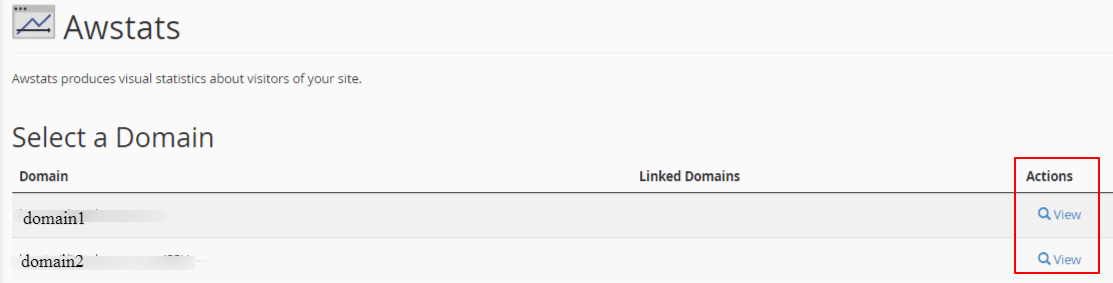
- Pick your domain if asked. Then click the name of the tool again.
- Read the monthly summary at the top.
Other tools may be there too, such as Webalizer, Raw Access and Bandwidth. Which ones appear depends on your plan. Ask Hostvento support if one is missing.
What the numbers mean
| Term | Plain meaning |
|---|---|
| Unique visitors | How many different people or devices came |
| Number of visits | How many times people came, even the same person twice |
| Pages | How many web pages were opened |
| Hits | Every file the server sent, including pictures |
| Bandwidth | How much data your site sent out |
Hits are always bigger than pages, because one page loads many small files.
More useful reports
- Pages: shows your most popular pages.
- Referrers: shows where visitors came from, like a search engine or another site.
- Browsers and operating systems: shows what visitors use.
- HTTP status codes: shows errors such as 404, which means page not found.
Things to remember
- These tools count bots too, such as search engine robots. So the numbers can look higher than real people.
- Stats may update only once a day.
- For more detail about people, many owners add a free tool like Google Analytics to their site.
Tip: Check the 404 report often. Fixing broken links keeps visitors happy.
Quick recap
- Traffic means visits to your site.
- Find the tools in the Metrics section of cPanel.
- Use Visitors and Awstats.
- Unique visitors show different people, and hits count every file.
- Bots are counted too.