

What is Site Publisher?
Site Publisher is a tool inside cPanel. It gives you page templates. A template is a ready design with spaces for your own words and pictures. You fill in the blanks and publish. It is good for a small page such as a business card site or a coming soon page.
If you do not see it, it may be off on your plan. Ask Hostvento support.
Warning: publishing to a domain that already has a site can replace its home page. Take a backup first.
Steps
- Log in to cPanel.
- In the Domains section, click Site Publisher.
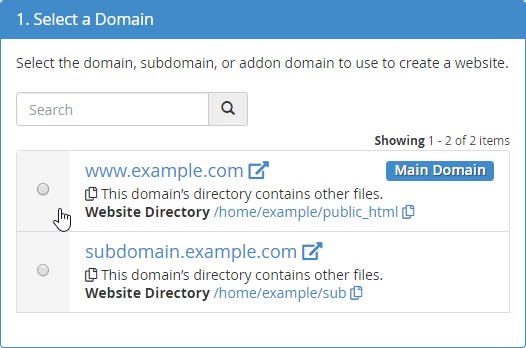
- Click Create a Site and choose the domain you want to use.
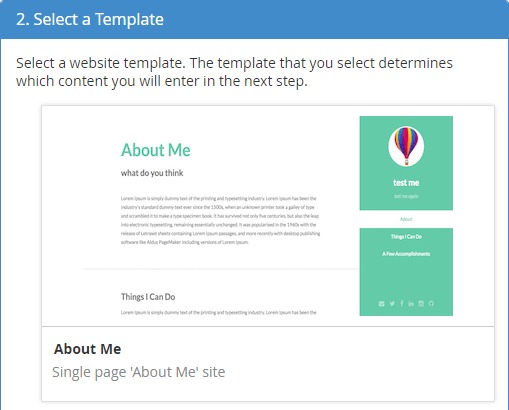
- Pick a template that suits you. For example, choose one for a business or for a personal page.
- Click Select on your chosen template.
- Fill in the form. You will enter your site name, a short slogan and contact details.
- Add the text for your pages in the boxes.
- Upload a logo or picture if the form has a place for it.
- Click Publish.
- Open your domain in a browser to see the result.
Editing the site later
- Go back to Site Publisher in cPanel.
- Open the Sites list.
- Click Edit Site beside your domain.
- Change anything and click Publish again.
Good to know
- It makes a simple site, not a big shop.
- For a larger site, consider WordPress or a site builder.
- Only contact details you type will appear. Do not add private data.
Tip: Your domain must already point to your hosting. If the site does not show, check your nameservers.
Quick recap
- Site Publisher is a template-based site maker in cPanel.
- Choose a domain and a template.
- Fill in the form and click Publish.
- Edit later from the Sites list.