

What is the site URL?
A URL is a web address, like https://example.com. WordPress keeps two addresses:
- WordPress Address (URL): where your WordPress files are.
- Site Address (URL): the address visitors type to reach your site.
Most of the time they are the same. Warning: if you type a wrong address, you can lock yourself out of your dashboard. Take a full backup of your files and database first. A database is the store where WordPress keeps your posts and settings.
Way 1: Use the dashboard
- Log in to your WordPress dashboard.
- Go to Settings, then General.
- Find WordPress Address (URL) and Site Address (URL).
- Type the new address in both boxes. Start with
https://if you have an SSL certificate. An SSL certificate encrypts the data between your visitors and your site. - Click Save Changes.
You will be logged out. Log in again at the new address.
Way 2: Use wp-config.php
Use this if you cannot reach the dashboard. The file wp-config.php holds your main site settings.
- Open File Manager in your hosting control panel, or use FTP.
- Open the WordPress folder, often
public_html. - Right-click
wp-config.phpand choose Edit. - Above the line that says "That's all, stop editing", add:
Replacedefine( 'WP_HOME', 'https://example.com' ); define( 'WP_SITEURL', 'https://example.com' );https://example.comwith your real address. These lines override the saved address. - Save the file.
Way 3: Use phpMyAdmin
phpMyAdmin is a tool that lets you edit the database in your browser.
- Open phpMyAdmin from your control panel.
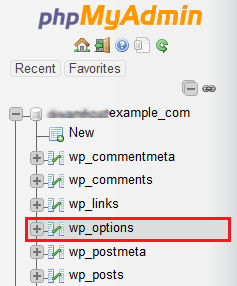
- Click your WordPress database.
- Open the table ending in
options, such aswp_options. - Find the rows
siteurlandhomein theoption_namecolumn.
- Click Edit on each row and change
option_valueto the new address.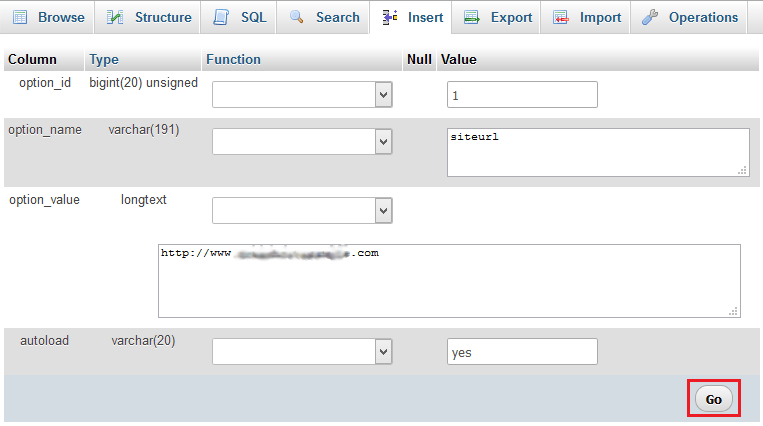
- Click Go.
After the change
Old links inside your posts may still use the old address. A search and replace plugin can fix them. Go to Plugins, then Add New, and search for one. Run it carefully, after a backup. Also, a new domain must point to your hosting through its DNS settings. DNS is the internet's phone book. Ask Hostvento support if you are unsure.
WP_HOME lines later if you want to manage the address from the dashboard again.Quick recap
- WordPress has a WordPress Address and a Site Address.
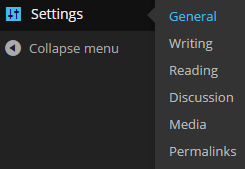
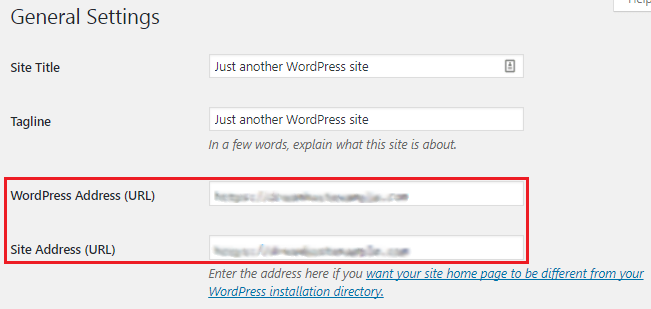
- Change both in Settings then General.
- If locked out, use
wp-config.phpor phpMyAdmin.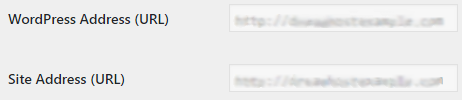
- Back up first, then fix old links afterwards.