

What are SFTP and FileZilla?
SFTP stands for SSH File Transfer Protocol. It moves files between your computer and your server, like normal FTP. The difference is that SFTP scrambles everything on the way, so no one can read your password or files. It is like sending a letter in a locked box.
FileZilla is a free program for moving files. You can download it from the official FileZilla website. Choose the FileZilla Client.
SFTP uses SSH, so SSH access must be on for your account. Ask Hostvento support if your plan has it. The details you need are usually in your welcome email:
- The host, which is the server name or address.
- Your username and password.
- The port. This is a numbered door on the server. SFTP often uses port 22, but your host may use a different number.
Steps: quick connect
- Open FileZilla.
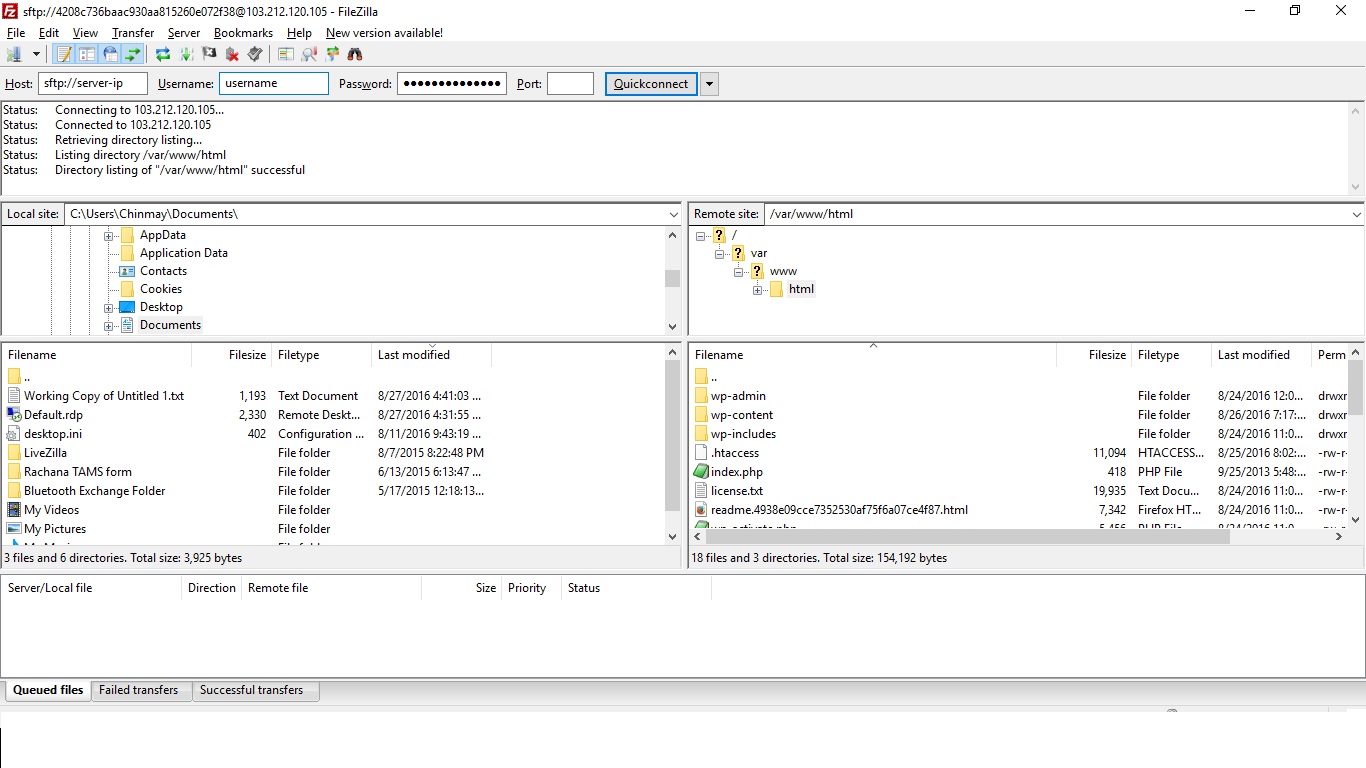
- Find the Quickconnect bar under the toolbar.
- In Host, type
sftp://followed by your server name. Example:sftp://yourserver. - Type your Username.
- Type your Password.
- Type the Port.
- Click Quickconnect.
- A box may ask about an unknown host key. A host key is the server's ID card. Check that the details are right, tick Always trust this host if you want, and click OK.
Steps: save the connection
Save it so you do not type the details every time.
- Click File, then Site Manager.
- Click New Site and give it a name.
- Set Protocol to SFTP - SSH File Transfer Protocol.
- Fill in Host and Port.
- Set Logon Type to Normal.
- Type your User and Password.
- Click Connect.
Some servers use a key file instead of a password. Choose Key file as the Logon Type, and browse to your private key. FileZilla may offer to convert it. Say yes.
Move files
- The left side shows your own computer. The right side shows the server.
- On the right, open the folder of your website. This is often
public_html. - Drag a file from left to right to upload it.
- Drag a file from right to left to download it.
Warning: if you upload a file with the same name as one on the server, it can overwrite the old one. Download a copy first if you need it.
If the connection fails
- Check the host, username, password and port for typing mistakes.
- Make sure the protocol is SFTP, not FTP.
- Check that SSH is allowed on your plan, and that a firewall is not blocking the port.
Quick recap
- SFTP moves files safely, using encryption.
- Get host, username, password and port from your welcome email.
- Use Quickconnect with
sftp://, or save a site in Site Manager. - Drag files between the two sides to upload and download.