

What is a brute force attack?
A brute force attack is when a program guesses passwords again and again. It tries thousands of combinations until one works. It is like someone trying every key on a huge ring to open your door.
WordPress login pages are common targets. Strong habits and a few tools make these attacks fail.
Step 1: Use a strong password
- In the dashboard, click Users, then Profile.
- Scroll to Account Management and click Set New Password.
- Use the suggested password, or make a long one with letters, numbers and symbols.
- Click Update Profile.
Step 2: Do not use "admin" as a username
Attackers guess "admin" first. Create a new administrator user with a different name, log in with it, then delete the old "admin" user. WordPress lets you give the old user's posts to the new one.
Step 3: Limit login attempts
A plugin is an add-on for WordPress. Some plugins lock out anyone who fails to log in too many times.
- Go to Plugins, then Add New Plugin.
- Search for a plugin that limits login attempts.
- Click Install Now, then Activate.
- Open its settings and choose how many tries are allowed, for example three to five.
Step 4: Add two-factor login
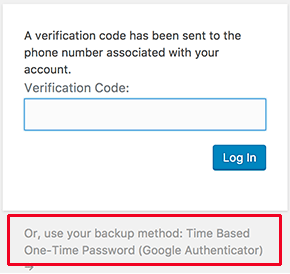
Two-factor login asks for a second proof, like a code from your phone. Even if someone learns your password, they cannot get in. Many security plugins offer this.
Step 5: Protect the login page with a password
Some control panels let you add a second password on a folder. In cPanel you can look for Directory Privacy. You could protect the wp-admin folder. Test your site afterwards, because some features may need that folder open. Ask support if unsure.
Step 6: Keep everything updated
- Go to Dashboard, then Updates.
- Update WordPress, plugins and themes.
Step 7: Use a firewall
A firewall is a guard that blocks bad visitors. Some security plugins include one. Some services also filter traffic before it reaches your site. Ask Hostvento support what protection is on your plan.
Quick recap
- Brute force means guessing passwords many times.
- Use strong passwords and avoid the username "admin".
- Limit login attempts and add two-factor login.
- Keep WordPress, plugins and themes updated.
- Back up regularly.