

What is FS_METHOD?
FS_METHOD tells WordPress how to write files on your server. FS means "file system". A constant is a setting stored in the wp-config.php file. WordPress reads it when the site starts.
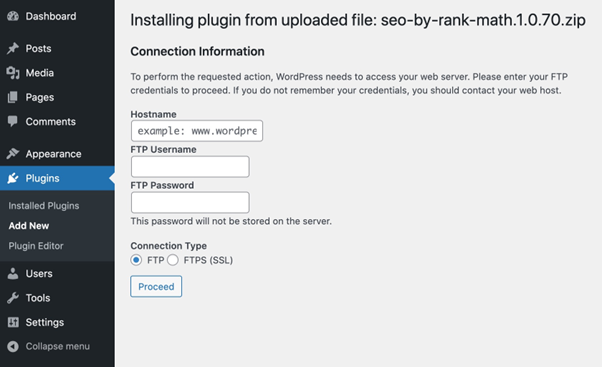
WordPress tests whether it can write files by itself. If the test fails, it shows a box asking for FTP details. FTP is a way to send files to a server. This often happens when file owners on the server do not match.
Setting FS_METHOD to direct tells WordPress to write files directly, without asking for FTP.
Warning: Edit wp-config.php carefully. A small typing mistake can take your site down. Take a backup of the file first. Fix file ownership if you can, since that is the cleanest cure.
Steps
- Log in to your client area at https://secure.hostvento.com/clientarea.php and open your hosting control panel.
- Open File Manager.
- Go to the folder where WordPress is installed, often
public_html. - Right-click
wp-config.phpand choose Copy to make a backup copy. - Right-click the original and choose Edit.
- Find the line that says
/* That's all, stop editing! Happy publishing. */. - Above that line, add:
define( 'FS_METHOD', 'direct' );This line tells WordPress to write files directly.
- Click Save Changes.
- Go to your WordPress dashboard and try the update or install again.
Other values
| Value | Meaning |
|---|---|
direct | Write files directly on the server. |
ftpext | Use the PHP FTP extension. |
ssh2 | Use SSH2, a secure connection. |
ftpsockets | Use FTP through sockets. |
Most people only need direct.
If it still asks for FTP
- The folders may have the wrong permissions. Folders are usually 755 and files 644.
- The files may belong to a different user. Ask Hostvento support to check ownership through a ticket at https://secure.hostvento.com/submitticket.php.
Tip: Do not use 777 permissions to fix this. That lets anyone write to your files and is unsafe.
Quick recap
- FS_METHOD controls how WordPress writes files.
- Add
define( 'FS_METHOD', 'direct' );to wp-config.php. - Place it above the "stop editing" line.
- Back up the file first.
- Fix ownership and permissions if the problem stays.