

What is an inode?
An inode is a small record that Linux keeps for each file and folder. It is like a library card for a book. The card stores the book's details, but not the story. Each file needs one inode. Each folder needs one too.
A disk has a fixed number of inodes. So you can run out of inodes even when you have free disk space. Many small files, such as cache files or old emails, use up inodes fast. When they run out, you may see errors like "No space left on device".
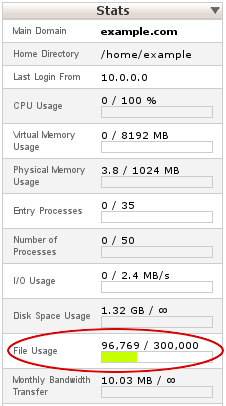
Hosting plans often set an inode limit. Ask Hostvento support what yours is.
Check your inode use
You need a terminal. A terminal is a window where you type commands. On a VPS or dedicated server you can use SSH to open one.
df -iThis shows inode totals, used and free for each disk.
Count files in a folder
find /home/username -type f | wc -lThis counts all files under /home/username. Replace the path with your folder. find lists the files, and wc -l counts the lines.
find /home/username | wc -lThis counts files and folders together. That number is close to your inode use.
Find the busiest folders
- Go into the folder you want to check:
cd /home/usernameThis moves you into that folder.
- Run this command:
for d in */; do echo "$(find "$d" | wc -l) $d"; done | sort -nThis counts items in each subfolder, then sorts the list from smallest to largest. The last lines show the folders with the most files.
Free up inodes
- Delete old backups and logs.
- Clear cache folders of your website apps.
- Empty the trash and old email folders.
- Remove unused plugins and themes.
In cPanel, the File Manager and Disk Usage tools show space by folder. In DirectAdmin, check the usage page.
Need help? Open a support ticket.
Quick recap
- An inode is a record for one file or folder.
- You can run out of inodes before disk space.
- Use
df -iandfind ... | wc -lto count. - Clean cache, logs and old backups to free inodes.