

What is a URL redirect?
A URL is a web address, like https://example.com/shop. A redirect sends visitors from one URL to another. It is like mail forwarding when you move house. Letters sent to the old address reach you at the new one.
Steps
- Log in to your client area.
- Open your hosting service and go to cPanel.
- Scroll to the Domains section. Click Redirects.

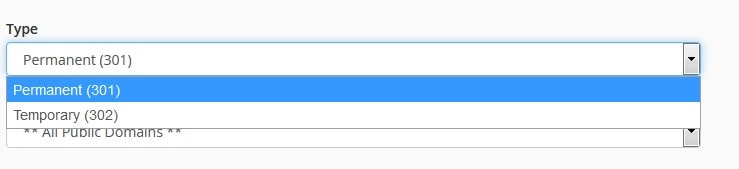
- Next to Type, choose Permanent (301) if the move is forever. Choose Temporary (302) if it is short.
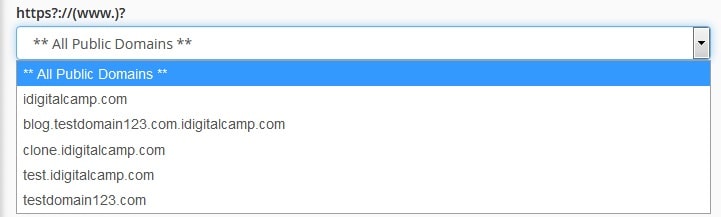
- Pick the domain from the https://(www.) list.
- In the empty box, type the old page or folder. Leave it blank for the whole site.
- In Redirects to, type the new full address, starting with
https://. - Choose a www. redirection option. Most people choose to redirect with or without www.


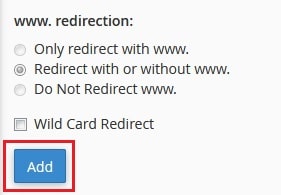
- Click Add.
cPanel shows a success message. The redirect works right away.
Test it
- Open a private browser window.
- Type the old address.
- You should land on the new address.
Another way: the .htaccess file
.htaccess is a small settings file for your website. cPanel writes your redirect into it. You can also add a line by hand. Open File Manager, go to public_html and edit .htaccess. Add this line:
Redirect 301 /old-page https://example.com/new-pageThis sends /old-page to the new address. Take a copy of the file first, because a typo can break your site.
Tip: A site that uses WordPress may already have rules in .htaccess. Do not delete them. Put your new line above the WordPress block.
Quick recap
- Open Domains then Redirects in cPanel.
- Choose 301 for permanent or 302 for temporary.
- Type the full new address.
- Test in a private window.