

What is an addon domain?
A domain is a website name, like example.com. An addon domain is an extra domain that you add to your hosting account. It gets its own folder and shows its own website. It is like renting one flat but putting two name plates on separate rooms.
Your plan may limit the number of addon domains. Check your plan details or ask Hostvento support.
Before you start
- Own the new domain.
- Point its name servers to Hostvento. Name servers are like a signpost that sends visitors to the right server. They are in your welcome email.
Steps
- Log in to the client area.
- Click Services, choose your hosting, and open cPanel.
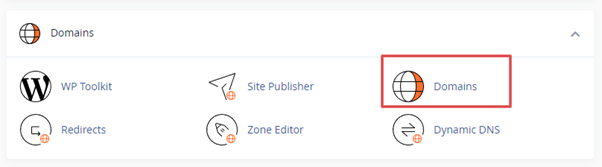
- In the Domains section, click Domains. Older versions have an Addon Domains icon.
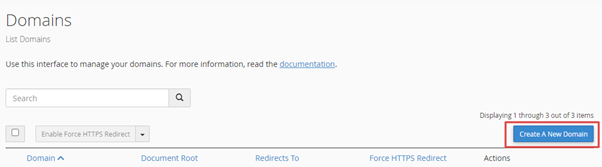
- Click Create A New Domain. In older versions, fill in the form that shows on the page.
- Type the new domain name in the Domain box.
- cPanel suggests a folder name. This is the document root, the folder where the site files will live. Keep it or change it.
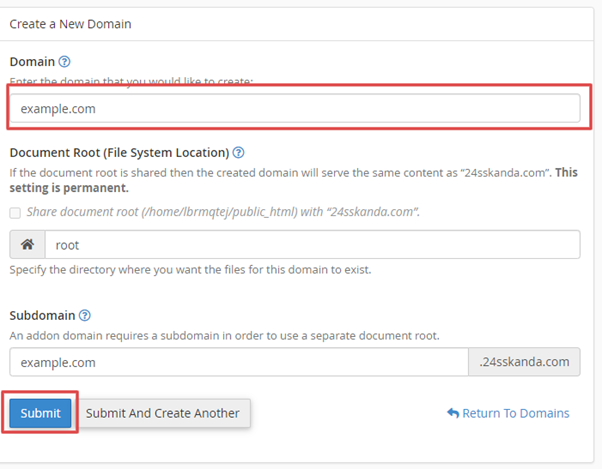
- Turn off the option to share the main domain's document root. Do this if you want a separate site.
- Click Submit.
cPanel shows a message when the domain is added.
After you add it
- Open File Manager in cPanel.
- Go to the folder you chose.
- Upload your website files, or install a script such as WordPress there.
Test it
If the name servers were changed recently, wait some hours for DNS to spread. Then open the new domain in a browser.
Common problems
- Domain already exists: It may be on another account or already added here.
- Does not resolve: The name servers still point elsewhere. Fix them first.
- Wrong site shows: Check the folder of the addon domain.
Tip: To remove an addon domain later, back up its files first. Removing the domain can delete its folder.
Quick recap
- An addon domain is a second website on the same account.
- Point its name servers to Hostvento first.
- Add it in cPanel under Domains and choose a folder.
- Upload the site files and test.