

What is an MX record?
DNS is like a phone book for the internet. An MX record (mail exchanger) is a line in that book. It tells the world which server receives email for your domain. It works like the address of your post office.
Each MX record has two parts:
- Destination: the name of the mail server, like
mail.example.com. - Priority: a number. The lowest number is tried first. The others are backups.
Your email provider will tell you the exact names and numbers to use. Copy them exactly.
Before you start
If you change MX records, email can stop arriving. Write down the old records first, or take a screenshot. You can then put them back if needed.
Steps
- Log in to cPanel.
- In the Domains section, click Zone Editor.

- Find your domain and click Manage.
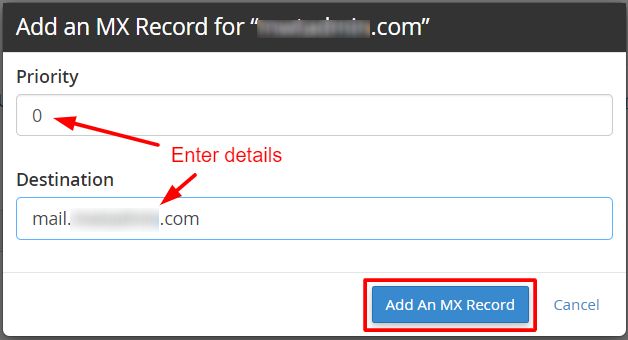
- Click Add Record. If you see a dropdown, choose Add MX Record.

- In Name, type your domain, like
example.com. - Set Type to MX.
- In Priority, type the number, such as
10. - In Destination, type the mail server name given by your provider.
- Click Add Record.
Repeat for each MX record your provider gives you.
Remove old records
If you move to a new email provider, delete the old MX records. Next to each one, click Delete. Mixed records can send mail to two places.
Another important setting
Go to cPanel Email Routing. Set it to Remote Mail Exchanger if your mail is handled outside this server. Choose Local Mail Exchanger if it is handled on this server. A wrong choice can make email bounce.
Check and wait
DNS changes can take a few hours to spread. After that, send a test email to your address from another account.
If your DNS is not in cPanel, add the record where your name servers are managed. Need help? Open a ticket at https://secure.hostvento.com/submitticket.php.
Quick recap
- An MX record sends your email to the right server.
- Use Zone Editor, then Manage and Add Record.
- Lower priority numbers are tried first.
- Note the old records first and remove old ones after a move.