

What is DNS?
DNS is like a phone book for the internet. It turns a website name into a number that computers understand. Each line in the book is a record.
| Record | What it does |
|---|---|
| A | Links a name to a server's IP address. |
| CNAME | Makes one name an alias of another name. |
| MX | Says which server receives your email. |
| TXT | Holds text, often for email safety or proof of ownership. |
| NS | Lists the name servers of the domain. |
Before you start
A wrong change can take your website or email offline. Take a screenshot of the current records first. Then you can put them back.
You must edit DNS where your domain's name servers point. Name servers are the computers that hold the phone book for your domain. If you edit somewhere else, nothing will change.
Steps in cPanel
- Log in to cPanel.

- Open Zone Editor in the Domains section.
- Click Manage next to your domain. A list of records opens.
- To change one, click Edit on its row. Change the value and click Save Record.
- To add one, click Add Record. Choose the type, fill in the boxes, and save.
- To remove one, click Delete on its row and confirm.
Steps in the Hostvento client area
- Log in at https://secure.hostvento.com/clientarea.php.
- Click Domains, then My Domains.
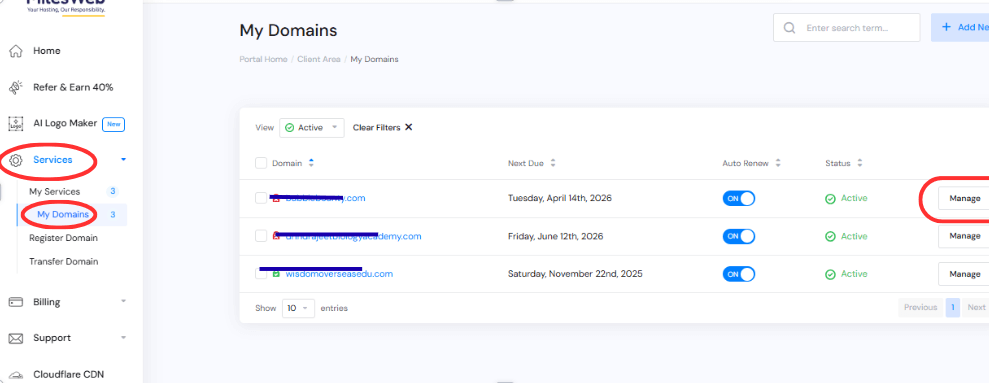
- Click Manage Domain for the domain.
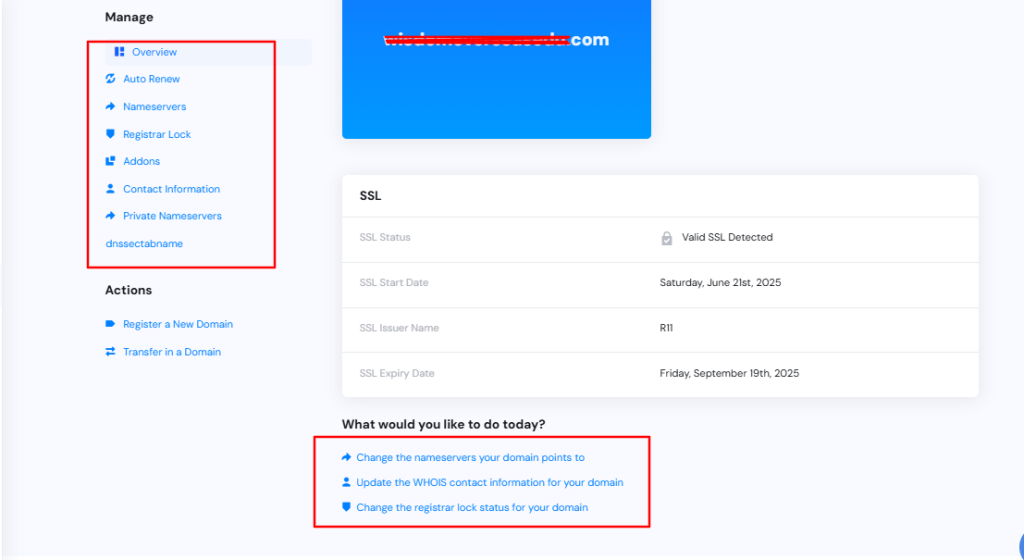
- Look for a DNS management option in the menu. If you cannot find it, ask support.
Change the name servers
To move DNS to another company, change the name servers in Manage Domain, under Nameservers. Use the names the new company gave you.
After you edit
- Wait for the change to spread. This can take a few minutes to some hours.
- Open your site in a private window.
- Send a test email if you changed email records.
Tip: Never delete records you do not understand. Ask Hostvento support first at https://secure.hostvento.com/submitticket.php.
Quick recap
- DNS records connect your domain to your website and email.
- Edit them where your name servers point.
- In cPanel, use Zone Editor and Manage.
- Note old values first and allow time to spread.