

What is a parked domain?
A domain is a website name, like example.com. A parked domain (also called an alias) is a second name that shows the same site as your main domain. A redirect is like a sign saying "we moved, go here". It sends the visitor from one address to another.
With redirection off, a visitor to the alias sees your site, but the alias name stays in the address bar. With redirection on, the bar changes to your main name.
Why use a redirect?
- Visitors always see one name.
- Search engines see one main site, not many copies.
Without redirects, you can keep each name visible. This suits brand names that you want people to see.
Turn redirection on
- Log in to the client area, open Services, and go to cPanel.
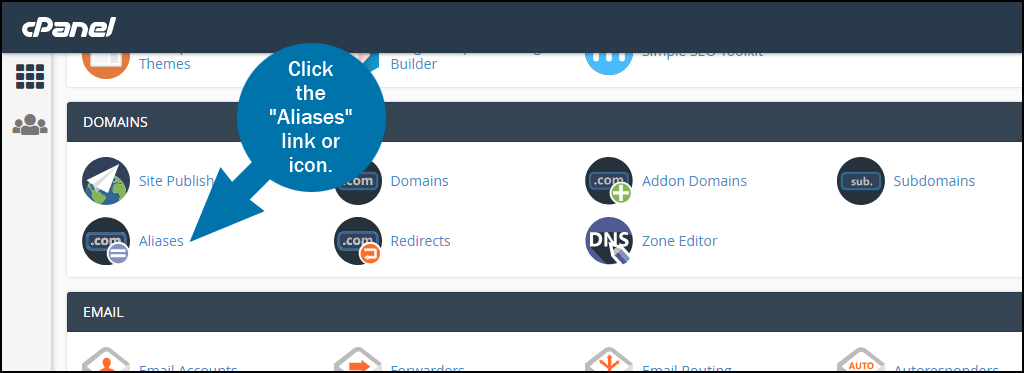
- Open Domains. In older versions, open Aliases or Parked Domains.
- Find your alias in the list.
- Under Redirects To, click Manage Redirection.
- Choose the main address you want visitors sent to, like
https://example.com. - Click Save.
Newer cPanel versions make this a simple switch. Older ones show a box for the address.
Turn redirection off
- Go to the same page in cPanel.
- Find your alias, and click Manage Redirection.
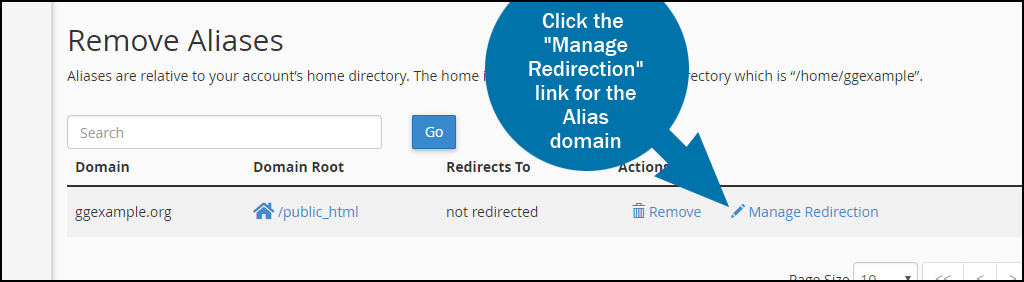
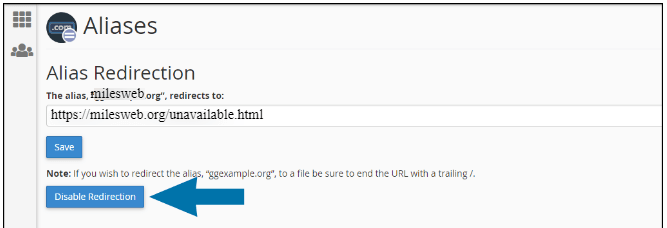
- Clear the address, or choose the option to not redirect.
- Click Save.
The alias will now show the same site under its own name.
Alternative: use the Redirects tool
- In cPanel, open Redirects.
- Choose the type, Permanent (301) or Temporary (302). Use a permanent one when the move is final.
- Pick the alias in the domain list and type the target address.
- Click Add.
To remove it, find it in the list at the bottom and click Delete.
Test it
- Open a private browser window.
- Type the alias.
- Check whether the address bar changes.
Browsers remember permanent redirects. If you do not see a change, clear the cache.
Quick recap
- An alias shows your site under another name.
- A redirect sends visitors to your main name.
- Use Manage Redirection in Domains to switch it on or off.
- Test in a private window.