

What are private nameservers?
DNS is like a phone book for the internet. Nameservers are the computers that hold the phone book entries for your domain. Normal nameservers carry the name of a hosting company. Private nameservers (also called child nameservers or glue records) carry your own domain name, like ns1.yourdomain.com.
People use them to give their hosting a branded look. Resellers use them often. Each private nameserver needs an IP address. An IP address is the number address of a server.
Before you start
- You need the IP addresses for your nameservers. Get them from your hosting provider. If your hosting is at Hostvento, they are in your welcome email, or you can ask Hostvento support. Do not guess them.
- Hosting providers often give two IP addresses, one for each nameserver.
- Be careful. A wrong nameserver setting can take your site and email offline. Write down your current settings first.
Steps
- Log in to your GoDaddy account.
- Open your Domain Portfolio or My Products and click your domain.
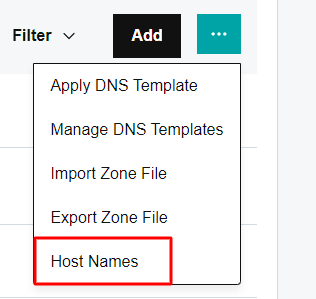
- Open DNS and then find Hostnames. On older screens, look for Advanced Features and then Host names.
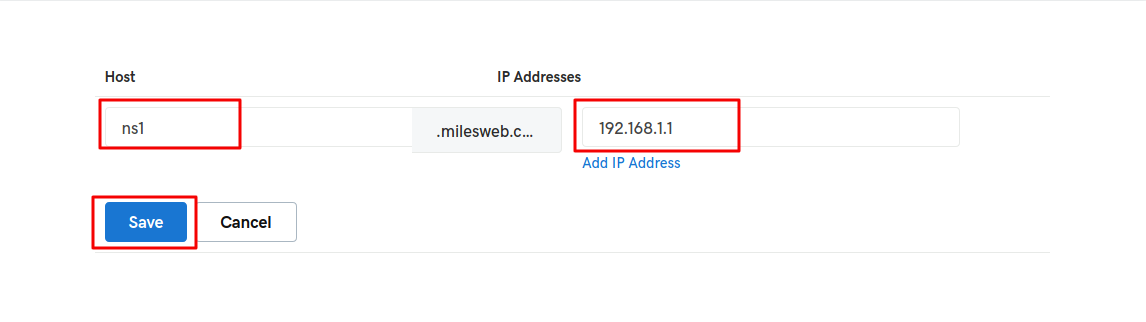
- Click Add.
- Type
ns1in the host name box. GoDaddy adds the domain for you.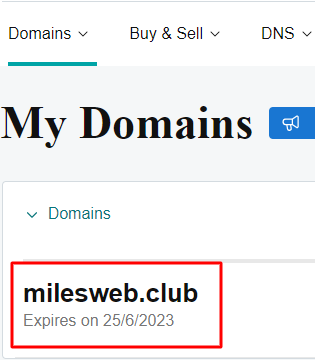
- Type the first IP address.
- Click Save.
- Click Add again. Type
ns2and the second IP address. Save.
Use the new nameservers
Creating them does not switch your domain yet. You must set them on the domain.
- In the domain settings, open Nameservers.
- Click Change Nameservers.
- Choose I'll use my own nameservers.
- Type
ns1.yourdomain.comandns2.yourdomain.com. - Click Save.
Tip: Your hosting must also have DNS records for the domain. If not, the website will not load after the switch. Ask your host to set this up.
Waiting time
Changes spread slowly. This is called propagation. It may take a few hours, up to a day or more.
Need help? Open a ticket at https://secure.hostvento.com/submitticket.php.
Quick recap
- Private nameservers use your own domain name.
- Get the IP addresses from your host.
- Add ns1 and ns2 under Hostnames at GoDaddy.

- Then set them as the domain's nameservers.
- Wait for propagation.