

What does removing a domain mean?
cPanel is the control panel for your hosting account. It is like the dashboard of a car. A domain is your website name, such as example.com. An addon domain is an extra domain added to the same account. A subdomain is a front part added to a name, such as blog.example.com.
When you remove a domain, cPanel stops serving that website from your account. Visitors will no longer see it from here.
Steps
- Log in to your cPanel. Your welcome email has the login details. You can also open it from the Services menu of your client area.
- Back up the website files and databases. Use the Backup or Backup Wizard icon.
- Find the Domains section. On older cPanel versions, look for Addon Domains instead.
- Click Domains or Addon Domains.
- Find the domain you want to remove in the list.
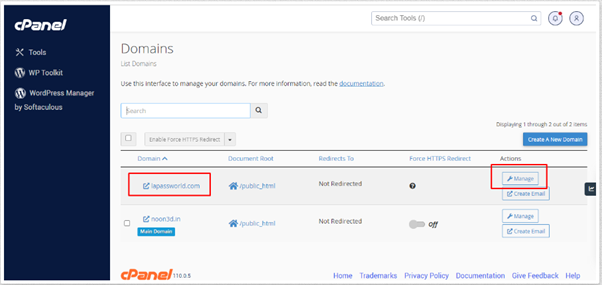
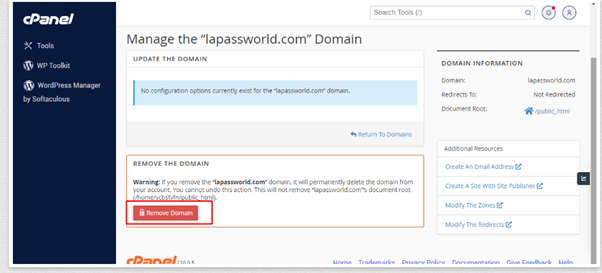
- Click Manage next to the domain, then choose Remove Domain. On older versions, click Remove.
- Read the message on the screen. It tells you what will be removed.
- Confirm by clicking the button that agrees to the removal.
- Wait for the green success message.
What about the files and email?
cPanel may keep the website folder, but this can differ. Check the folder in File Manager after the removal. Delete it only if you are sure you do not need it.
Email accounts that use the domain may stop working. Save any old messages you want before you remove it.
The main domain
You cannot remove the main domain of an account this way. It is the domain the account was created with. To close it, ask Hostvento support. You can open a support ticket.
Quick recap
- Back up your files and emails first.
- Open cPanel, then Domains or Addon Domains.
- Choose the domain and click Remove.
- Check File Manager for leftover folders.
- The main domain needs help from support.