

What is an addon domain?
cPanel is a control panel, which is a web page for managing hosting. An addon domain is an extra domain with its own website, hosted inside your main account. It has its own folder for its files. Think of it as a second shop that shares your building.
What does removing do?
Removing an addon domain takes it off your cPanel account. The domain no longer loads this site. But the website files in its folder may stay on the server. You can delete them yourself. Emails, databases and subdomains linked to it may also need to be removed by hand.
Warning: Deleted files cannot always be brought back. Take a full backup of the site, its databases and its email before you start.
Step 1: Back up
- In cPanel, open Backup or Backup Wizard.
- Download a full copy of your account or the home directory and databases.
- Keep the files somewhere safe.
Step 2: Remove the addon domain
- Log in to cPanel.
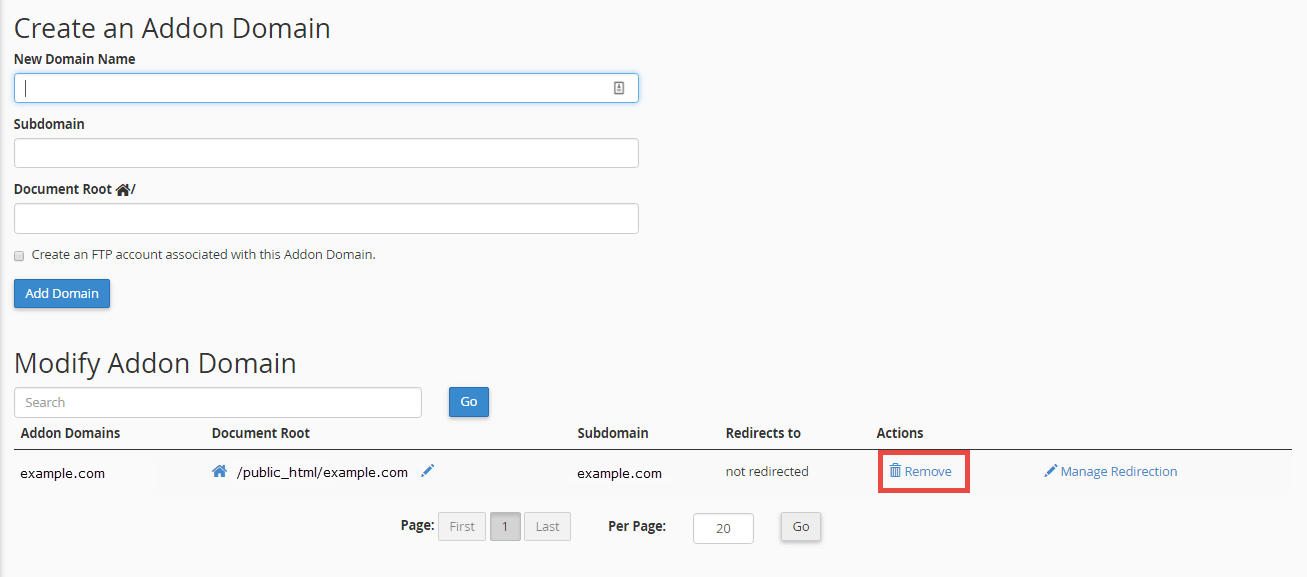
- Open Domains. On older versions, open Addon Domains.

- Find the domain in the list.
- Click Manage next to it, then Remove Domain. In old versions, click Remove or the trash can icon.
- Read the message. If it asks whether to delete the files, think before you say yes.
- Confirm the removal.
Step 3: Clean up what is left
- Open File Manager. Delete the old domain's folder if you no longer need it.
- Open Email Accounts. Delete email accounts for that domain, if not needed.
- Open MySQL Databases. Delete the old site's database, if not needed.
- Open Zone Editor. Remove leftover DNS records for the domain, if they exist.
If you also want to cancel the domain
Removing it from cPanel does not cancel the domain registration. To manage renewal, log in to the client area and open Domains.
If the remove button does not work, open a support ticket.
Quick recap
- An addon domain is an extra site on your account.
- Back up first.
- Use Domains in cPanel and choose remove.
- Clean up files, email, databases and DNS records afterwards.
- Removing it from cPanel does not cancel the domain registration.