

What is a nameserver?
A nameserver is a computer that knows where websites live. It is like a signpost for visitors. Private (or custom) nameservers use your own domain name instead of the host's name. For example, ns1.yourdomain.com.
What do you need first?
- A domain name you own.
- Two IP addresses for your server. Two nameservers should have two different IPs. Ask Hostvento support if you need extra IPs.
- DirectAdmin Admin or Reseller access.

Step 1: Make the DNS records in DirectAdmin
- Log in to DirectAdmin.
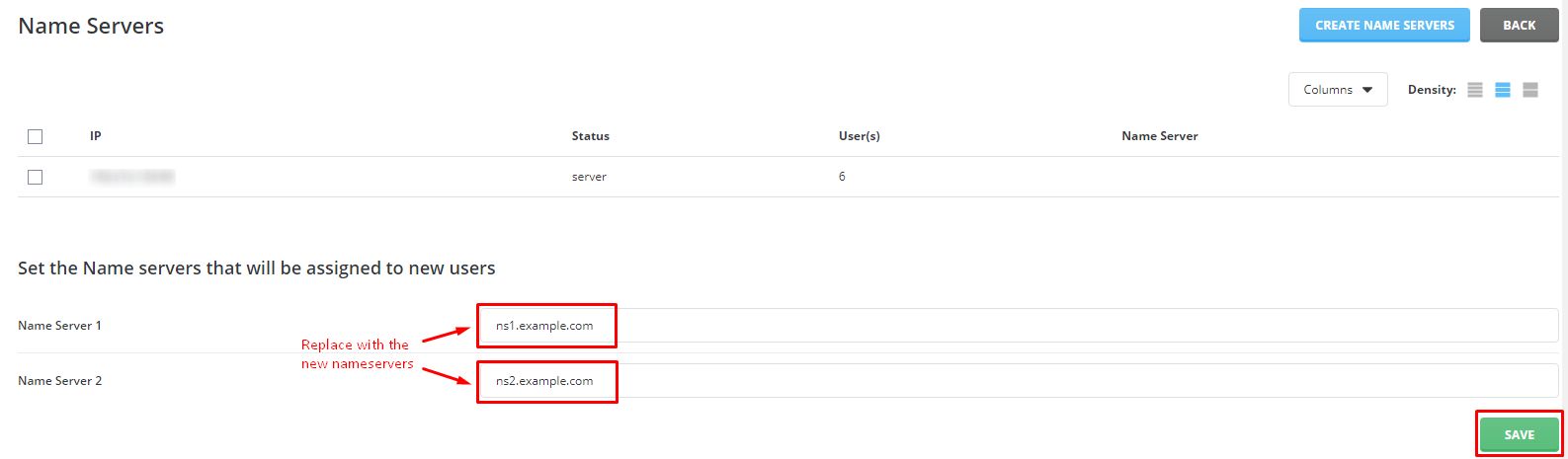
- Open Admin Level (or Reseller Level), and click Name Server Setup. You can search for it at the top of the page.
- Type your first nameserver, like
ns1.yourdomain.com. - Type your second one, like
ns2.yourdomain.com. - Select the IP address for each one.
- Click Save.
Some versions ask you to add the name to the domain's DNS records as well. Open DNS Management for yourdomain.com and add two A records named ns1 and ns2. Point each to its IP. An A record is a line in DNS that points a name to an IP address.
Step 2: Register them at your domain registrar
The internet must also know these names exist. This is called a glue record, or a child nameserver.
- Log in to the client area if your domain is registered with Hostvento.
- Click Domains, then My Domains.
- Choose your domain, then look for Register Nameservers or Private Nameservers. The label can differ.
- Enter
ns1and the first IP. Save. - Do the same for
ns2and the second IP.
Step 3: Use them
- In Manage Nameservers, choose custom nameservers.
- Enter
ns1.yourdomain.comandns2.yourdomain.com. - Save.
Tip: Domains that use these nameservers need DNS zones on your server. Add each domain in DirectAdmin first, or its site will not load.
Check it
nslookup -type=ns yourdomain.comThis lists the nameservers your domain uses. Changes can take up to 48 hours to spread.
Need help? Open a support ticket.
Quick recap
- Private nameservers use your own domain name.
- Set them in DirectAdmin under Name Server Setup.
- Register them as child nameservers at the registrar.
- Then point your domains to them.
- Two different IPs are needed.