

What is happening?
A domain controller is a Windows server that keeps a list of users and computers in a network. Think of it as the front desk of an office building. To join it, your computer must first find it.
DNS is like a phone book for the internet. It turns a name into a number. If your computer asks the wrong phone book, it cannot find the domain controller. You then see an error like "An Active Directory Domain Controller could not be contacted".
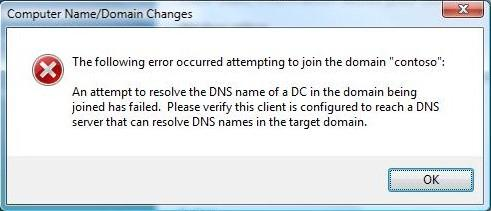
Steps to fix it
- On the computer that will join, press the Windows key and type cmd. Open Command Prompt.
- Check the current DNS server with this command.
ipconfig /allThis shows your network settings. Look for the line called DNS Servers.
- Make sure the DNS server is the IP address of your domain controller. Do not use a public DNS server such as your router.
- If it is wrong, open Control Panel, then Network and Sharing Center, then Change adapter settings.
- Right-click your network card and choose Properties.
- Select Internet Protocol Version 4 (TCP/IPv4) and click Properties.
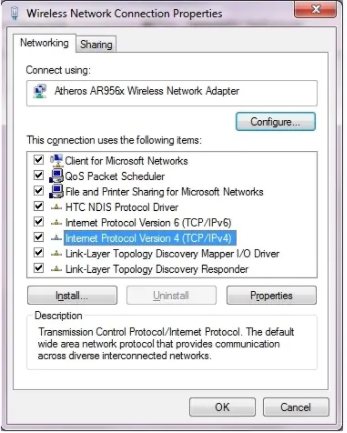
- Choose Use the following DNS server addresses and type the domain controller IP in Preferred DNS server.
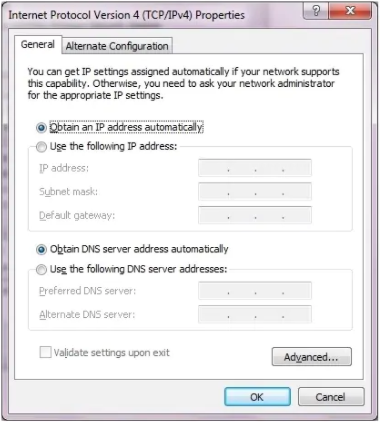
- Click OK.
- Test the name with this command. Replace the example with your domain name.
nslookup example.localThis asks DNS for the domain. It should show the domain controller's IP address.
- Clear old saved answers with this command.
ipconfig /flushdnsThis empties the saved list of DNS answers on your computer.
- Try joining the domain again in System Properties, under Change.
Other things to check
- The domain controller is switched on and running the DNS Server role.
- The firewall allows DNS traffic on port 53. A port is like a numbered door on a computer.
- The computer's clock is close to the server's clock. Large time gaps cause errors.
- You typed the full domain name correctly.
Tip: Write down your old DNS settings before changing them. Then you can go back if something goes wrong.
Quick recap
- Joining fails when the computer cannot find the domain controller through DNS.
- Point the computer's DNS to the domain controller's IP.
- Test with
nslookupand clear old answers withipconfig /flushdns. - Check firewall, server status and clock if it still fails.