

What is a parked domain?
A domain name is the address of a website. A parked domain, also called an alias, is a second address that leads to the same site. It is like having two street names for one house. Visitors arrive at the same place.
People use it for spelling variations, old brand names, or the same name with a different ending like .net and .com.
Parked domain or addon domain?
- A parked (alias) domain shows the same content as another domain.
- An addon domain is a separate website with its own files.
In newer cPanel versions, parked domains are called Aliases and are found in the Domains tool.
Before you start
- You must own the second domain.
- Its nameservers must point to your hosting. The nameservers are in your welcome email. Ask Hostvento support if unsure.
Steps in newer cPanel
- Log in to cPanel.
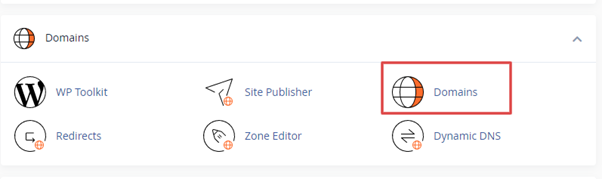
- Open Domains.
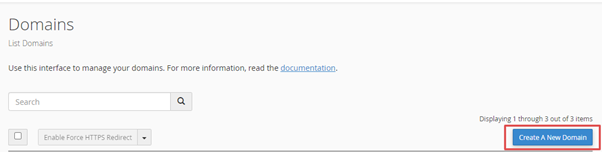
- Click Create A New Domain.
- Type the second domain name in the Domain box.
- Untick Share document root only if you want a separate folder. To make it a true alias, keep it ticked.
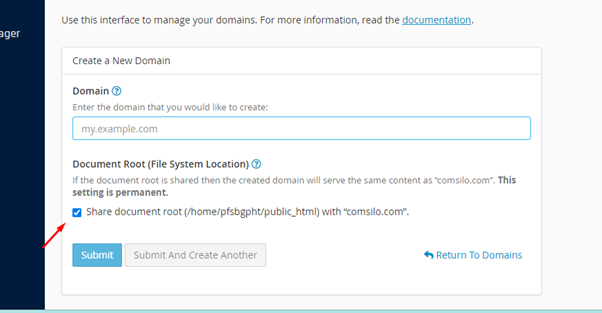
- Click Submit.
Sharing the document root means both names use the same folder of files. The document root is the folder where your site files sit.
Steps in older cPanel
- Log in to cPanel.
- Open Aliases or Parked Domains.
- Type the domain name.
- Click Add Domain.
Tip: cPanel menus change between versions. Look for "Aliases" or "Parked Domains" if you cannot find the exact button.
Test it
- Wait a few hours if you just changed nameservers. DNS can take up to 48 hours to spread.
- Type the parked domain in your browser.
- You should see your main site.
Tip: Search engines may see two copies of one site. To avoid this, redirect the alias to the main domain, or ask a developer to set a canonical link.
Quick recap
- A parked or alias domain shows the same site under another name.
- An addon domain is a separate website.
- Use the Domains tool in cPanel to add one.
- Point the nameservers to your hosting first.