

What is Webmail?
Webmail is an email program that lives on a website. You do not install anything. You open a page, log in, and your inbox appears. It works like Gmail, but it is for your own domain name, such as you@yourdomain.com.
Plesk is a control panel. A control panel is a web page where you manage your hosting. It is like the dashboard of a car.
Before you start
You need an email account on your domain. You also need its password. If you have no email account yet, create one in Plesk first, under the Mail section.
Steps
- Log in to your Plesk panel. Your welcome email has the login link and details. If you cannot find it, open the client area or ask support.
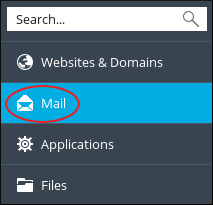
- Click Mail in the left menu.
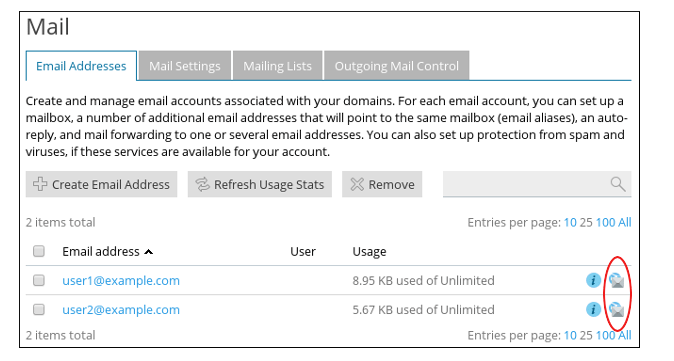
- Find the email address you want to open.
- Click the small Webmail link or icon next to that address. A new browser tab opens.
- Type the full email address and its password.
- Click Login. Your inbox opens.
Some Plesk versions show a different layout. If you do not see a Webmail link under Mail, open Websites & Domains, find your domain, and look for a Mail tab or a Webmail button there.
Choose a mail program
Plesk may offer more than one Webmail program. Two common ones are Roundcube and Horde. Each one looks a little different. Pick the one you like. Both can read, write, and sort email.
If you cannot log in
- Check that you typed the full address, not only the name before the @ sign.
- Check that Caps Lock is off. Passwords care about big and small letters.
- Reset the password in Plesk under Mail if you forgot it.
Still stuck? Open a support ticket and tell us what you see on the screen.
Quick recap
- Webmail is email you read in a web browser.
- In Plesk, go to Mail and click Webmail next to your address.
- Log in with the full email address and its password.
- Reset the password in Plesk if you forgot it.