

What is a sub-account?
Think of Plesk as an apartment building. The owner has the master key. Each customer has a key to only their own flat. A sub-account is that single flat. It has its own websites, mail and files.
Plesk is a control panel, which is a web page where you manage your hosting. If you have a reseller or admin level login, you can step into a customer's account without asking for their password. This guide is for you if you manage other people's sites.
Steps
- Log in to Plesk with your main account. Your welcome email has the link and login.
- Click Customers in the left menu. On some setups this is called Subscriptions.
- Find the customer in the list. Use the search box if the list is long.
- Click the customer's name or the small arrow next to it.
- Click the Log in button or the Login as customer link. Plesk opens that customer's panel.
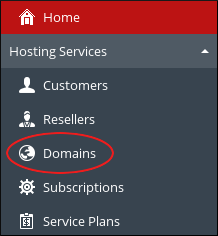
- Do your work in the customer's panel. You see what they see.
- When finished, look at the top of the page for a link to return to your own account. Click it. You can also click Log out and sign in again.
Tip: Warning: anything you change inside the sub-account is a real change for that customer. Be careful with delete buttons. Take a backup first if you are unsure.
If you cannot see the Customers menu
- Your plan may not include customer management. Ask Hostvento support.
- You may be logged in as a normal user. Normal users only see their own account.
- You can open a support ticket to check your access level.
Why use this?
It saves time. You can fix a customer's email or website without asking them for details. It is also safer, because they never have to share their password with you.
Quick recap
- A sub-account is one customer's separate space in Plesk.
- Open Customers and pick the person.
- Use the Log in link to enter their panel.
- Return to your own account when done.
- Be careful, because changes there are real.